concept datum in category swift

This is an excerpt from Manning's book Swift in Depth.
After reading this chapter, you may find that you’re modeling data better, writing enums just a bit more often, and ending up with safer and cleaner code in your projects.
//: Decodable allows you to turn raw data (such as plist files) into songs
struct Song: Decodable {
    let duration: Int
    let track: String
    let year: Int
}

struct Artist {

    var name: String
    var birthDate: Date
    var songsFileName: String

    init(name: String, birthDate: Date, songsFileName: String) {
        self.name = name
        self.birthDate = birthDate
        self.songsFileName = songsFileName
    }

    func getAge() -> Int? {
        let years = Calendar.current
            .dateComponents([.year], from: Date(), to: birthDate)
            .day

        return years
    }

    func loadSongs() -> [Song] {
        guard
            let fileURL = Bundle.main.url(forResource: songsFileName,
    withExtension: "plist"),
            let data = try? Data(contentsOf: fileURL),
            let songs = try? PropertyListDecoder().decode([Song].self, from:
    data) else {
                return []
        }
        return songs
    }

    mutating func songsReleasedAfter(year: Int) -> [Song] {
        return loadSongs().filter { (song: Song) -> Bool in
            return song.year > year
        }
    }

}
See if you can clean up the Artist type by using lazy and/or computed properties.
Assuming loadSongs is turned into a lazy property called songs, make sure the following code doesn’t break it by trying to override the property data: // billWithers.songs = []

This is an excerpt from Manning's book Hello Swift!: iOS app programming for kids and other beginners.
Good job! With this section, you’ve completed the second milestone, and you’re a mile closer to completing your journey. In chapter 3, you learn how to insert data into the computer’s brain.
What the different types of data are and why they’re required How to convert one type of data to another
When you create a variable in your code, you’re telling your app that you need it to save a piece of information. The iDevice uses the variable name to create a place in its memory where it can store this important data. The reason you want to store data is that you need to use it again. As an example, take a look at figure 3.1.
Figure 3.1. Two variables stored in the computer’s memory. One variable is named age, with the value 12 stored in the computer’s memory, and the other variable is called name, with the value "Frank" saved in the computer’s memory.
![]()
Variables are useful. Think of a variable as being like a place in the computer’s brain that can store data. This data can be anything, such as a name, an address, your grade, your age, or how much something costs. One reason why you need variables is because you may need to keep track of something that will change. Maybe the data you stored with the variable age is wrong now because you’re a year older, for example. You can write a line of code that changes the data that the variable age points to in memory.

This is an excerpt from Manning's book Classic Computer Science Problems in Swift: Essential techniques for practicing programmers.
Saving space (virtual or real) is often important. It is more efficient to use less space, and it can save money. If you are renting an apartment that is bigger than you need for your things and family, then you may “downsize” to a smaller place that is less expensive. If you are paying by the byte to store your data on a server, then you may want to compress it so that its storage costs you less. Compression is the act of taking data and encoding it (changing its form) in such a way that it takes up less space. Decompression is reversing the process, returning the data to its original form.
If it is more storage-efficient to compress data, then why is all data not compressed? There is a tradeoff between time and space. It takes time to compress a piece of data and to decompress it back into its original form. Therefore, data compression only makes sense in situations where small size is prioritized over fast execution. Think of large files being transmitted over the internet. Compressing them makes sense because it will take longer to transfer the files than it will to decompress them once received. Further, the time taken to compress the files for their storage on the original server only needs to be accounted for once.
// train over first 140 irises in data set 20 times
let irisTrainers = Array(irisParameters[0..<140])
let irisTrainersCorrects = Array(irisClassifications[0..<140])
for _ in 0..<20 {
    irisNetwork.train(inputs: irisTrainers, expecteds: irisTrainersCorrects,
     printError: false)
}

This is an excerpt from Manning's book iOS Development with Swift.
Table 1.1. iOS SDK abstraction layers
Sorting the data— You’ll explore sorting your data and giving the user the ability to select the sort order with a segmented control.
Back in the BooksTableViewController class, you can now set the sort-Order in the changedSegment method when the segmented control value changes. The indices of the segments coincide with the indices of the enumeration, so you can instantiate a SortOrder enumeration directly from the segmented control’s selected index. You can then pass this straight into the booksManager, and request the table to reload. If you ran your app now, selecting a different sort order wouldn’t trigger the data to be sorted. The BooksManager has to call the sort method whenever the sortOrder changes. There’s a trick in Swift for detecting when a property changes, called a property observer. (More on property observers in the sidebar “Property observers.”)guard let sortOrder = SortOrder(rawValue: sender.selectedSegmentIndex) else {return} booksManager.sortOrder = sortOrder tableView.reloadData()
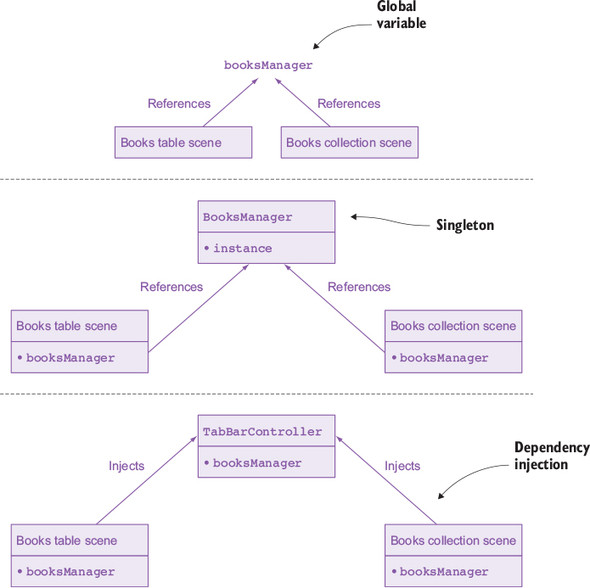
Notice that if you edit a book in one tab and then go to the other tab, your edits seem to have disappeared. Each tab is currently creating its own books manager and therefore its own set of data—producing two books arrays, or one for each tab. How can you ensure that both tabs use the same set of data?
Sharing data between view controllers is a theme that often pops up in iOS development. We’ve already looked at strategies for passing data when navigating with segues, but tab bars are a different beast altogether. As you’ve seen, they have relationship segues with their scenes, which don’t trigger the prepareForSegue method.
Several alternative solutions exist for sharing data between tabs, each with their own pros and cons: