An absolute CSS unit gives a measurement a fixed size: a pixel stays a pixel. That sounds reassuring, but fixed sizing can ignore user-adjusted text sizes and make layouts rigid on different screens. section 7.6
Common absolute units include:
- px (pixel): an absolute measurement equal to 1/96 of an inch. section 7.6
- pt (point): an absolute measurement equal to 1/72 of an inch. section 7.6
- Absolute values can override user text-size preferences, while relative units such as rem and percentages adapt to them. section 7.6
A fixed header versus a responsive header
With header { height: 64px; }, a larger default font can make the heading overflow its container and clip letter descenders. Changing the height to 4rem lets the header grow with the text. section 14.11
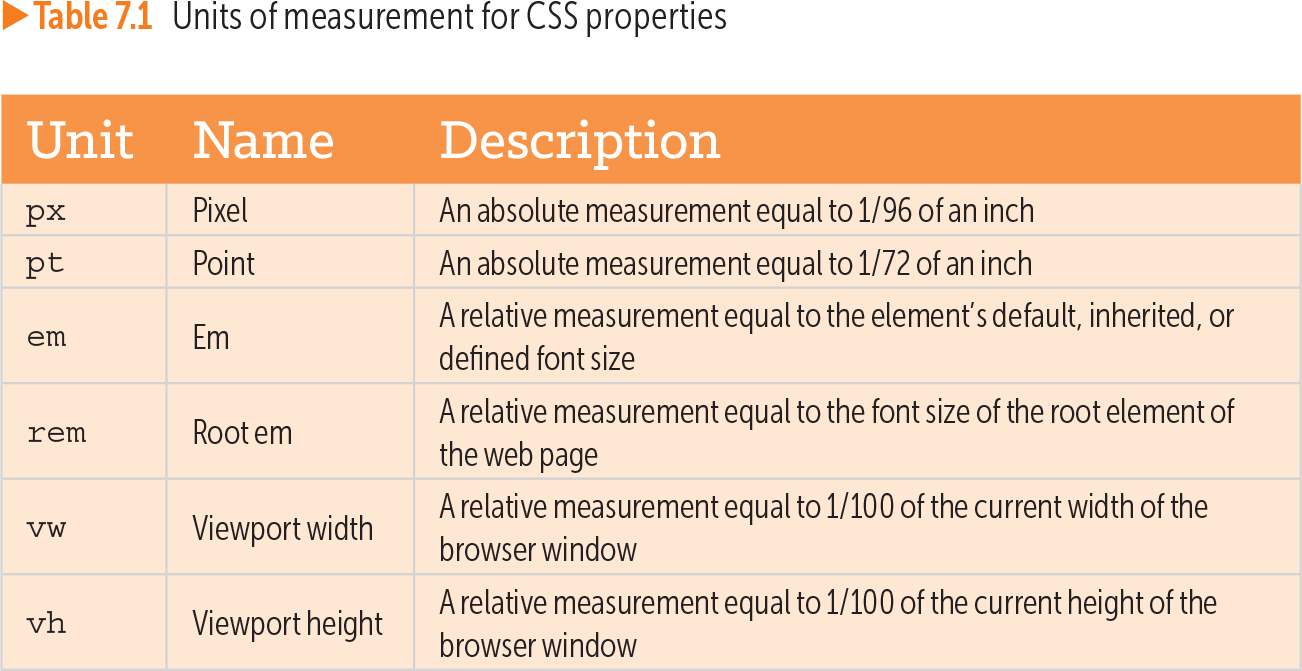
Table 7.1 Units of measurement for CSS properties (view table figure)
| Unit |
Name |
Description |
|---|---|---|
| px |
Pixel |
An absolute measurement equal to 1/96 of an inch |
| pt |
Point |
An absolute measurement equal to 1/72 of an inch |
| em |
Em |
A relative measurement equal to the element’s default, inherited, or defined font size |
| rem |
Root em |
A relative measurement equal to the font size of the root element of the web page |
| vw |
Viewport width |
A relative measurement equal to 1/100 of the current width of the browser window |
| vh |
Viewport height |
A relative measurement equal to 1/100 of the current height of the browser window |
Compare absolute units with em, rem, vw, and vh, whose sizes depend on inherited text, the root element, or the viewport. section 7.6