Acceleration is the rate at which velocity changes. In interface motion, it explains why an element can begin slowly, gain speed, and then slow before stopping instead of moving at one mechanical constant speed. Because people expect physical objects to build and lose momentum, acceleration and deceleration can make dialogs, notifications, and other moving UI feel more natural. section 12.1 section 12.6
Keep the motion chain clear: acceleration changes velocity; velocity changes position. On each animation frame, update velocity with the acceleration, then update position using velocity and elapsed time. A positive or negative acceleration changes speed and direction according to the coordinate system and current velocity. section 12.2.2 section 12.6
Accelerate a notification
A notification entering from the left can start with a velocity and add acceleration on every frame. `velocity += acceleration` increases its speed; `position += velocity * deltaTime` turns that speed into a new horizontal position. Using `performance.now()` to calculate `deltaTime` keeps the position update tied to elapsed time rather than a fixed frame count. section 12.2.2
Acceleration can also be designed through easing. In a CSS cubic Bézier timing curve, x is time and y is progress. The two inner control points shape how progress changes: the first affects initial acceleration, while the second affects when deceleration begins and how the animation approaches its finish. section 11.1.4 section 11.2.2
Use cubic-bezier() values to tune a motion profile:
- Lower x1 starts initial acceleration earlier; higher x1 delays it. section 11.2.2
- Higher y1 creates a more aggressive start; lower y1 creates a gentler one. A negative y1 can produce backward motion before moving toward the target. section 11.2.2
- Lower x2 begins deceleration earlier; higher x2 postpones it. section 11.2.2
- Values above 1 can overshoot the target, while negative y-values can create anticipation. section 11.2.2
Replace linear dialog motion with ease-out
A linear dialog calculates position directly from progress, so it moves at constant speed. An ease-out calculation such as `1 - Math.pow(1 - progress, 3)` changes that progress before it is multiplied by distance. The dialog arrives quickly and slows as it settles, giving the impression that momentum dissipates. section 12.1.1
Physics effects extend the same update chain. Gravity is constant positive acceleration added to vertical velocity in a screen coordinate system whose y-axis grows downward. A bounce reverses velocity at collision and reduces it to model energy loss. Springs apply acceleration proportional to distance from a target, while friction repeatedly reduces velocity. section 12.3 section 12.6
Figure 11.5 The cubic Bézier curve defined by cubic-bezier(0.7, -0.6, 0.25, 1.5)
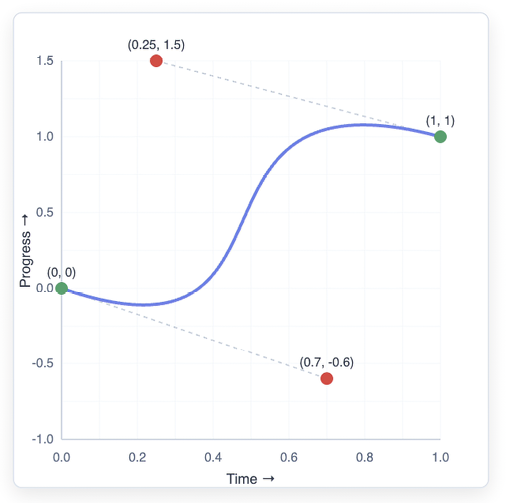
Inspect a curve with negative and above-target y-values to see anticipation followed by overshoot, two deliberately nonstandard acceleration profiles. section 11.2.2
Choose the profile for the interaction rather than treating easing as decoration. Linear motion suits constant spinner rotation; ease-out helps a modal settle; ease-in lets a notification accelerate away; and ease-in-out gives a balanced, coordinated transition. The practical goal is motion that communicates an action clearly without feeling abrupt or arbitrary. section 11.4

