A control can look clear on screen yet be difficult to use with a screen reader or voice control. An accessibility API is the bridge through which a browser exposes page information to assistive technology. It lets that technology ask for an element’s accessible name and respond to events such as focus changes or text updates. section 2.5.3
The browser builds an accessibility tree from the page and exposes it through the operating system’s accessibility layer. That tree depends on the underlying HTML: semantic elements, appropriate roles, names, and states help communicate what users can understand and operate. A table used only for layout may instead be announced as tabular data; the browser cannot infer the developer’s intent. section 2.5.3 section 1.1
When visible and accessible names disagree
A purchase button visibly says “Submit Order,” but an ARIA label gives it the accessible name “Confirm Purchase.” A voice-control user who speaks the visible words may not be able to activate it. Without that overriding label, the button’s visible text would supply its accessible name. By contrast, a visible “Email Address” label programmatically associated with its input gives users a consistent name for the field. section 2.5.3
TIP: Check whether an element’s accessible name includes the words users see, especially when they may speak those words to activate it. Prefer meaningful HTML and properly associated labels over trying to repair a confusing interface with an overriding name. section 2.5.3
Figure 2.7 After receiving a response from a server, the browser builds several internal representations of any web page, including a Document Object Model (DOM) tree, a layout and rendering structure, and an accessibility tree. The accessibility tree exists specifically for assistive technologies. It is derived from the DOM, but consists only of essential elements that matter for understanding and interaction, stripping away decorative elements and purely visual details that don’t convey meaningful content, structure, or functionality.
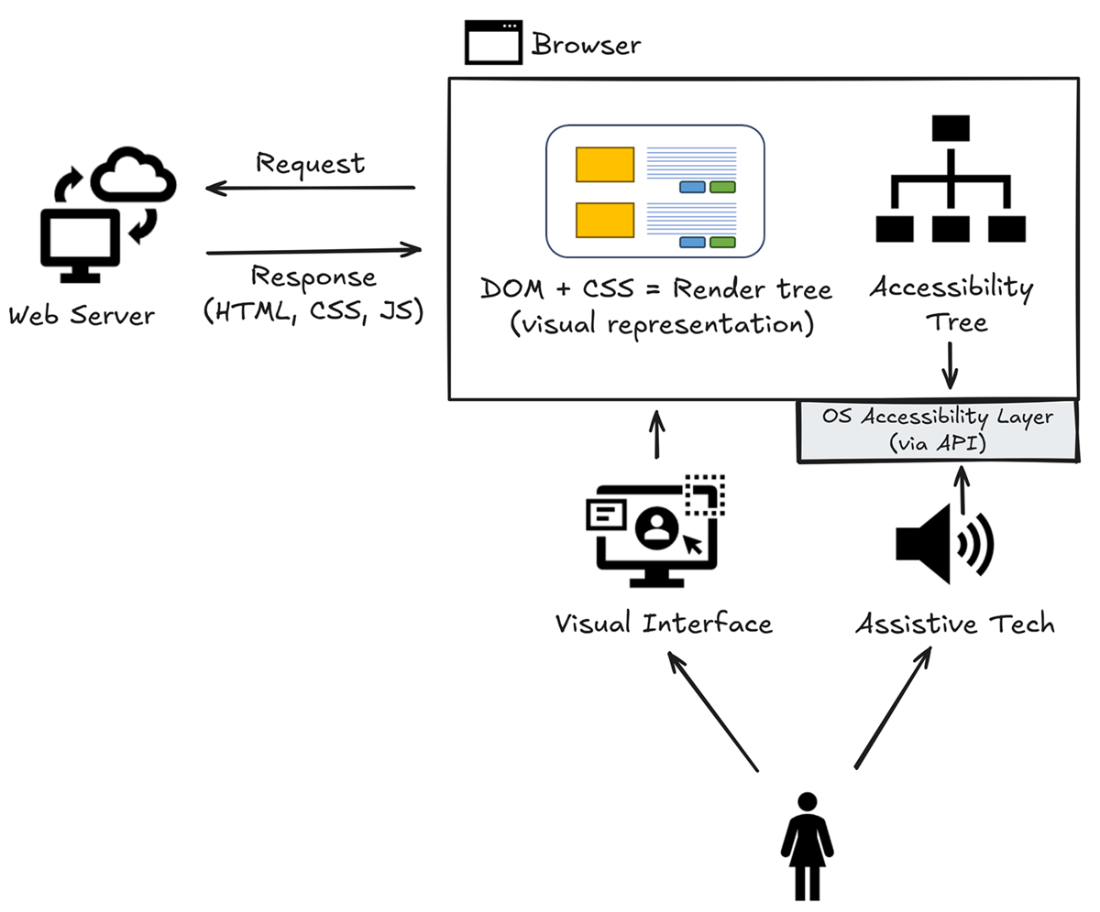
Follow how the browser derives an accessibility tree from the page’s DOM, retaining information needed for understanding and interaction rather than purely visual detail. section 2.5.3
