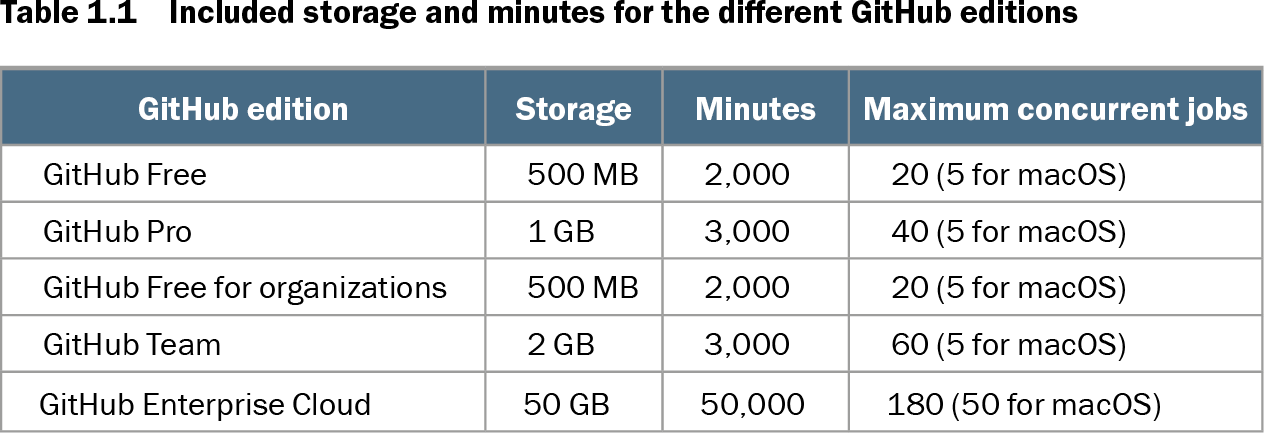
An action minute is the billed time used by GitHub Actions jobs. Included monthly minutes depend on the GitHub edition; public repositories use hosted runners free of charge, while private-repository usage draws from an included allowance and may require paid overage. section 1.4.3 section 1.4.4
Runner operating system changes minute consumption. Linux uses the standard rate, Windows uses minutes at 2×, and macOS at 10×. Thus, 1,000 minutes on Windows consume 2,000 included minutes, while 1,000 macOS minutes consume 10,000. section 1.4.4
Control action-minute spending by:
- Review job duration, parallelism, and short jobs; billing rounds each job up to at least one minute. section 12.4
- Combine very short parallel jobs when their work can run sequentially in one job. section 12.4
- Stop work made unnecessary by earlier failures, such as linting or further security checks after unit tests fail. section 12.4
- Use concurrency groups to cancel superseded high-volume builds, and improve job performance with sparse checkouts, caching, or large runners. section 12.5
Rounding makes tiny jobs expensive
Ten 30-second jobs can be billed as ten one-minute jobs. If their work can instead run sequentially in one job, the arrangement can save five billed minutes. section 12.4
For usage beyond the included allowance, standard two-core hosted-runner overage prices are $0.008 per Linux minute, $0.016 per Windows minute, and $0.08 per macOS minute. Monthly billed accounts default to a $0 spending limit; raising it permits charges until the limit is reached and triggers 75%, 90%, and 100% notifications. section 1.4.4
Action-minute reporting can support internal chargeback. Collect usage by repository, multiply minutes by a predefined cost, combine network traffic, and roll results up by team or repository topics for dashboards or monthly reports. Job-level data can help distinguish GitHub-hosted from self-hosted runner usage when both appear in a workflow. section 7.5
Table 1.1 Included storage and minutes for the different GitHub editions (view table figure)
| GitHub edition |
Storage |
Minutes |
Maximum concurrent jobs |
|---|---|---|---|
| GitHub Free |
500 MB |
2,000 |
20 (5 for macOS) |
| GitHub Pro |
1 GB |
3,000 |
40 (5 for macOS) |
| GitHub Free for organizations |
500 MB |
2,000 |
20 (5 for macOS) |
| GitHub Team |
2 GB |
3,000 |
60 (5 for macOS) |
| GitHub Enterprise Cloud |
50 GB |
50,000 |
180 (50 for macOS) |
Compare included storage, action minutes, and maximum concurrent jobs across GitHub editions before sizing hosted-runner usage. section 1.4.4
Figure 7.10 Action minutes overview report
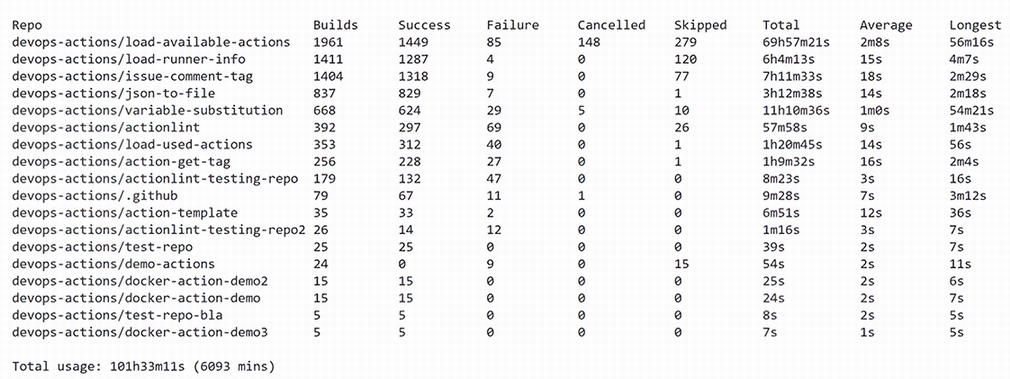
Use the report view as a model for presenting action-minute consumption by repository and organizational grouping. section 7.5