The Aggregation Pipeline Builder is a visual interface for constructing and configuring MongoDB aggregation pipelines. In MongoDB Compass, it displays collection documents, lets you add multiple processing stages, and previews the resulting dataset. section 3.3
Use the builder to:
- Add and arrange stages through the Aggregations tab. section 3.3
- Create pipelines from scratch or modify existing pipeline definitions. section 6.5
- Export a pipeline into application-ready code, including mongosh and Python syntax. section 6.5
- Preview intermediate or resulting aggregated data while developing a pipeline in Compass. section 3.3
Filtering and exporting a pipeline
Build a $match stage that filters documents by email address. Review the pipeline configuration in mongosh syntax, then export the equivalent pipeline in Python for integration into application code. section 6.5
Figure 3.2 The Aggregations tab is where you can add various stages of data processing. (Image © MongoDB 2025)

The Aggregations tab provides the visual workspace for adding data-processing stages. section 3.3
Figure 6.2 The interface shows the Export Pipeline to Language feature for a user-defined pipeline involving a match stage that filters documents by email addresses. On the left, the pipeline configuration is displayed in MongoDBs Shell (mongosh) syntax. On the right, the same pipeline is exported in Python syntax. (Image © MongoDB 2025)
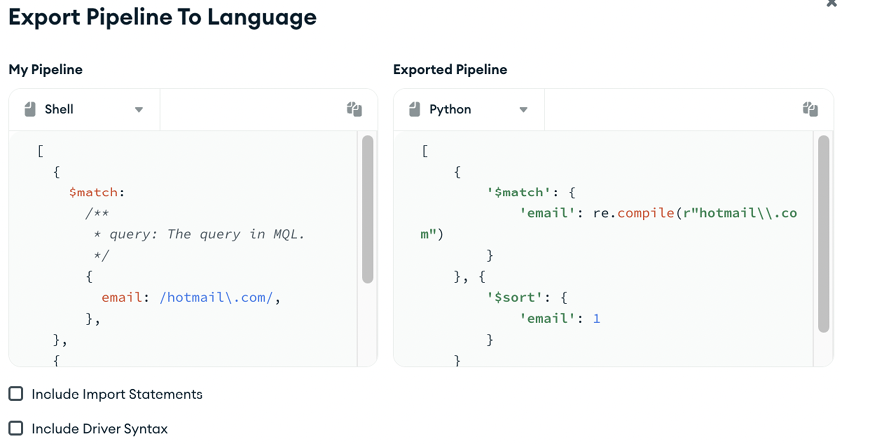
The export view contrasts a user-defined match pipeline in mongosh syntax with its Python representation. section 6.5
