MongoDB Atlas is a managed MongoDB database service across AWS, Azure, and Google Cloud. It provisions and operates database clusters, automating tasks such as deployment, scaling, upgrades, and backups so application teams can spend less time on server administration. Atlas also extends the database with services including full-text search, vector search, stream processing, and a SQL interface. section 1.0 section 10.0
Figure 1.2 High-level architecture of the MongoDB multicloud Atlas data platform, with key components such as the Document Model and Unified Query API, as well as foundational features like security, global multicloud capabilities, resilience, and elasticity. MongoDB supports diverse functionalities like full-text search, vector search, stream processing, SQL interface, analytics, and time series, all of which integrate with your applications and data across various environments. (Image © MongoDB 2024 CC BY-NC-SA 3.0)
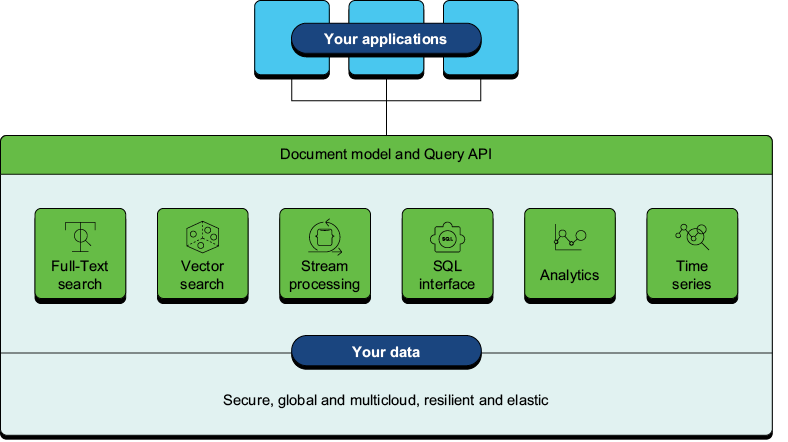
The platform diagram places the document model and unified Query API alongside Atlas services and multicloud foundations. section 1.3.2
Choose a deployment to match the workload, then check which capabilities its tier supports:
- M0 is a free starting point; Flex suits development, testing, and low-throughput applications. Both have limited Atlas features. section 10.0 section 10.7
- Dedicated M10 and M20 clusters suit development and low-traffic applications. M30 and higher tiers suit production and support replica set and sharded deployments. section 10.7
- Set minimum and maximum ranges if enabling autoscaling of tier or storage to respond to use while controlling costs. section 10.7
Create a first cloud cluster
Run `atlas cluster create "MongoDB-in-Action" --provider GCP --region CENTRAL_US --tier M0`, then check it with `atlas clusters list`. Atlas provisions the cloud infrastructure; you do not supply GCP credentials. Creation may take around five minutes. On a free cluster, Atlas manages MongoDB version upgrades rather than letting you select an installation version. If provisioning stalls, check the MongoDB service-status site. section 2.1.5
For availability or geographically distributed workloads, Atlas can place clusters across regions and cloud providers. Atlas clusters use replica sets with at least three MongoDB nodes. On supported tiers, analytics nodes can isolate reporting queries, while predefined replica set tags can direct reads toward particular node types, regions, or availability zones; those tags are unavailable on M0 and Flex. section 10.4 section 10.5 section 10.7
Managed does not mean security requires no configuration. Under Atlas’s shared responsibility model, MongoDB manages platform security and database operations, cloud providers handle physical infrastructure, and customers manage data access, identities, and selected security settings. Configure database roles and network access for the application; Atlas supports IP access lists, VPC peering, and private endpoints. Database authentication is enabled by default. section 20.1 section 20.2 section 20.6
Use Atlas monitoring, alerts, backups, and restore tools to operate a cloud deployment and investigate problems. For local development, the Atlas CLI can set up a local deployment with Docker and then list, pause, start, connect to, inspect logs for, or delete it. Local deployments support Atlas Search and Atlas Vector Search, but the CLI does not load a sample dataset into them; import downloaded data with `mongorestore` instead. section 21.0 section 13.3.1 section 13.6
