An agent skill is a reusable set of instructions for a specific task or workflow. In Claude, it is a folder containing a SKILL.md file and, when needed, scripts, templates, or reference material. It saves repeated prompting while allowing Claude to adapt the steps to the situation. section 4.0 section 4.1
Claude can select a skill automatically when its description matches a request, or you can invoke one explicitly with a slash command such as /adr-writer. Skill descriptions load first; the full instructions load when the skill is selected, and supporting references load as needed. A concise, specific description helps Claude recognize when to use the skill without crowding the context. section 4.4 section 4.8
Figure 4.3 Skills load in stages: every skill’s description is in context from startup, the full skill loads when a request matches, and reference files load if the skill needs them — so the context stays lean.
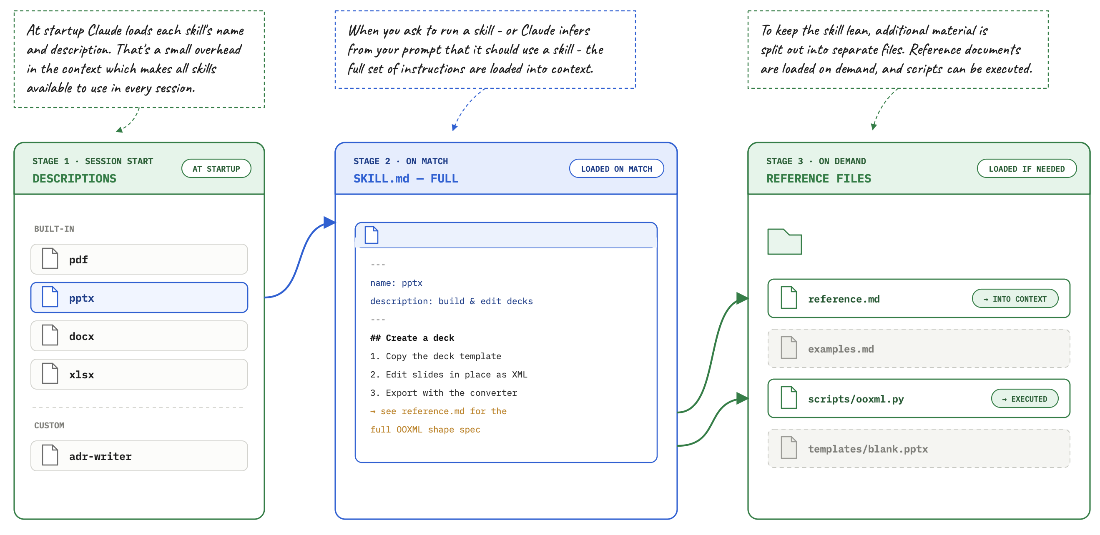
The diagram shows how descriptions, instructions, and reference files enter the context in stages. section 4.4
Create an ADR-writing skill
Ask Claude: “Create a skill called adr-writer that writes an Architecture Decision Record. The user provides a decision and its reasoning. Write docs/adr/{yymmdd}-{title}.md with title, status, context, decision, consequences, and alternatives. Research as needed and ask for clarification.” Review the generated markdown and test it with a real decision. Refine the instructions if the record needs more research or a challenge to the proposed decision. section 4.4 section 4.5
Design skills for work you repeat:
- Keep each skill focused on one job, with a description that makes its trigger clear. Include the steps and output structure, plus supporting resources where useful. section 4.5 section 4.1
- Review and test the results. A consistent format makes outputs easier to compare, but model behavior is not deterministic; keep judgment calls and risky decisions with a person. section 4.6 section 4.13
- Share a project skill in its repository, or bundle skills in a plugin for installation across Claude Desktop and Claude Code. Inspect third-party skills and understand their permissions before installing or approving actions. section 4.6 section 4.9 section 4.10
A schedule can run a skill on a recurring cadence; connectors can supply inputs or send outputs. Test a new scheduled task interactively and approve required permissions in advance. Scheduled runs require the computer to be on and Claude Desktop to be running. section 4.8 section 4.13