liveBook · Manning

Servo arm

As explained in Build Your Own Robot: Using Python, CRICKIT, and Raspberry Pi

A servo arm is a mechanically attached arm driven by a servo motor to perform controlled physical movement.

A servo arm is a mechanically attached arm driven by a servo motor to perform controlled physical movement. In a snack-pushing robot, it stays down while the robot travels, then swings up to knock over a matching snack before returning down. section 11.3 section 11.3.2

Control the arm as a reusable library function:

  • Set named servo angles for the up and down positions. section 11.3.2
  • Raise the arm, pause briefly, and return it to its original position. section 11.3.2
  • Call the arm after QR-code navigation finds the requested snack and the robot backs into position. section 11.3.2

Swing the arm

from adafruit_crickit import crickit import time SERVO_ANGLES = dict(up=70, down=180) def swing_arm(): crickit.servo_2.angle = SERVO_ANGLES['up'] time.sleep(0.5) crickit.servo_2.angle = SERVO_ANGLES['down'] time.sleep(0.5) section 11.3.2
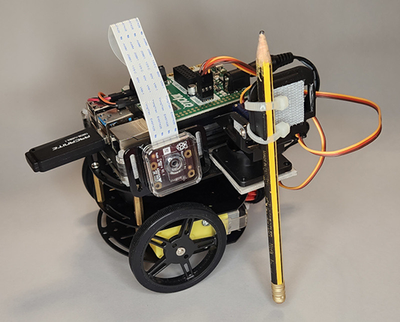
Figure 11.3 Snack-pushing robot: the servo motor is used to push snacks.

Use the side view to relate the camera’s QR-code detection path to the servo arm’s snack-pushing position. section 11.3

How Build Your Own Robot: Using Python, CRICKIT, and Raspberry Pi covers it

How deep it goes
Implements named servo angles, timed movement, and integration with navigation, but does not detail mechanical construction.
Examples
Demonstrates down and up positions while driving a robot along a track and knocking over QR-code-matched snacks.
What it assumes
Assumes basic Python and robot-library use while supplying the servo angles and movement sequence directly.
What you can do after
Operate/configure a servo arm through Python functions that raise, pause, and lower it during a robot task.
How it connects
Connects servo control with QR-code detection, DC motors, CSV data, and web-based robot control.

Related concepts

This explainer was generated by Manning's knowledge graph from the text of Build Your Own Robot: Using Python, CRICKIT, and Raspberry Pi. The section links point to the parts of the book it draws on.