A servo motor combines a DC motor with a position sensor, allowing software to command a specific position rather than simply drive continuously. This makes servos useful where a robot must place an arm, camera, or mechanism predictably. section 1.3.2 section 8.4.1
On a Raspberry Pi robot, an Adafruit CRICKIT HAT powers and controls multiple servos. A pan-tilt camera uses one servo for left-right pan and another for up-down tilt. section 1.3.3 section 8.4.1
Set and calibrate an angle
Import `crickit`, then set `crickit.servo_1.angle` to a position such as 0, 90, or 180. If the physical servo does not span the library default, set `actuation_range` to its measured range first; commands outside that range raise an error. section 8.4.1
For repeated movement, keep each servo’s connection, real range, allowed minimum and maximum, and starting angle in a data structure. Convert commands such as left, right, up, and down into small angle steps, and apply a change only when it remains within the configured limits. section 8.4.2
Camera sweep
Initialize the pan and tilt servos at safe starting angles, then issue paired left/up steps and right/down steps with short pauses. Limits prevent the camera mount from moving beyond the intended working range. section 8.4.2
Servo positions can also turn perception into physical action: a camera can move toward a detected face, or an arm can swing between down and up positions to push a snack after QR-code detection. section 9.0 section 11.3.2
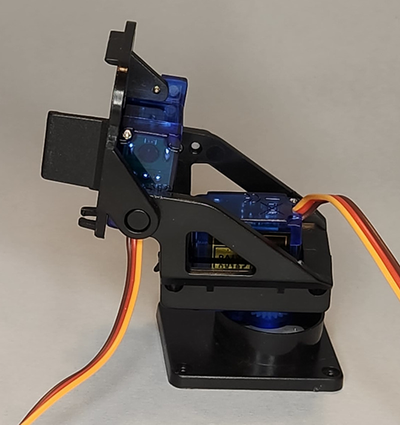
Inspect the two-servo pan-tilt assembly used to give a camera independent horizontal and vertical motion. section 8.4.1
