A DC motor turns a robot wheel, converting supplied electrical power into motion. A two-wheel robot uses one motor per side, so software can drive the robot forward, backward, turn, or spin in place by controlling the motors together or independently. section 1.3.2 section 3.0
Figure 1.2 Hardware stack: the Raspberry Pi is the main computer, and the CRICKIT handles the motors.
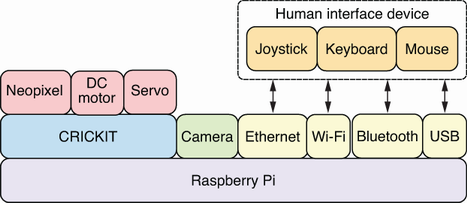
The Raspberry Pi runs the robot software, while the CRICKIT HAT supplies power and control for connected DC motors. section 1.3.3
Connect the motor’s two wires to a CRICKIT DC motor connector. Either wire orientation is safe at the connector. The CRICKIT can run multiple motors, including the left and right wheel motors in a chassis. section 2.5 section 3.2
Run and stop one motor
Use the Adafruit CRICKIT library in a Python REPL to set motor 1 to full speed, then stop it by setting its throttle to zero: from adafruit_crickit import crickit crickit.dc_motor_1.throttle = 1 crickit.dc_motor_1.throttle = 0 section 2.5
For reusable robot movement control:
- Control both wheel motors from one Python script, adjusting direction and speed for each movement. section 3.3
- Keep power adjustments in environment variables such as ROBO_DC_ADJUST_R rather than hard-coding them. section 3.3
- Use Python’s time.sleep to set how long motors run during a movement operation. section 3.3
- Wrap movement operations in readable functions, then refactor them into a motor library. section 3.0
DC motors also support task-level behavior. A robot can travel along a track while a camera searches its live feed for a QR code, then stop its motors after finding the target. section 10.1
