CRICKIT is an Adafruit HAT that connects to a Raspberry Pi GPIO connector and takes responsibility for powering and controlling robot actuators. It provides a practical boundary: the Raspberry Pi runs Linux and Python, while CRICKIT connects software commands to motors, touch input, and its onboard RGB Neopixel. section 1.3.3 section 2.1.2
The board supports the core hardware needed for small mobile-robot interactions:
- Connect and control up to two bidirectional DC motors, such as left and right wheel motors. section 2.1.2 section 3.2
- Connect and control up to four servo motors, including camera pan-and-tilt mechanisms. section 1.3.3 section 2.1.2
- Read four built-in capacitive touch inputs and drive the onboard Neopixel RGB LED. section 2.1.2
- Use the Adafruit Python CRICKIT library to operate motors, touch sensors, and the Neopixel from Python. section 2.1.2 section 2.7
Blink the onboard Neopixel
After activating the Python virtual environment, import crickit, set a low brightness, and fill the onboard pixel with RGB hexadecimal colors. Looping through red, green, and blue with a short time delay creates a visible multicolor blink. The library handles communication with CRICKIT’s onboard microcontroller. section 2.3 section 2.2
For wheel drive, attach one DC motor to each side of the robot and let CRICKIT supply power and control. A Python loop can poll a touch sensor and set a motor throttle to 1 or 0, linking a physical input directly to motor behavior. CRICKIT communicates with the Raspberry Pi over I2C; the expected board address is 0x49. section 2.7 section 3.2 section 2.3
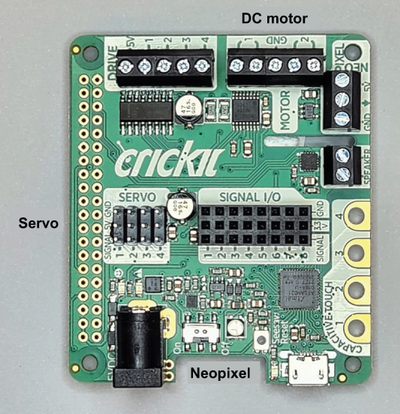
Use the board diagram to identify CRICKIT as the connection point for DC and servo motors between the Raspberry Pi and moving hardware. section 2.1.2
