Amazon Elastic Compute Cloud (EC2) provides virtual machines on AWS. An EC2 virtual machine is called an instance: it gives you an operating system on which to run applications. It is useful when a workload needs substantial computing power, network traffic, or continuous operation, but you remain responsible for operating the machine. section 3.0 section 6.1.3
An instance has an instance ID, an instance type that determines its CPU and memory, and an Amazon Machine Image (AMI) that supplies its operating system. It may also have a public IP address reachable over the internet. In the EC2 console, open Instances and select a machine to inspect these details; use its Monitoring tab to check metrics such as CPU utilization. section 2.2.1
Run a WordPress web tier
Run Apache, PHP, and WordPress on two Amazon Linux instances. Put an Application Load Balancer in front so requests go only to machines that pass its health check. Store the MySQL database in RDS and shared application files and uploads in EFS. Security groups control which traffic reaches the load balancer, web servers, and database. If one web server fails, the other must handle requests until it is replaced. section 2.1
Figure 2.1 The company’s blogging infrastructure consists of two load-balanced web servers running WordPress, a network filesystem, and a MySQL database server.
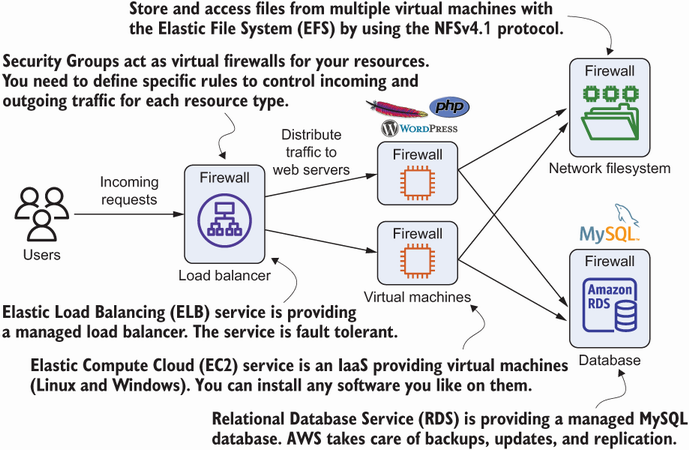
Use the diagram to locate the two EC2 web servers between the load balancer, shared filesystem, and database. section 2.1
A small deployment checklist:
- Choose a region with suitable latency, service availability, compliance, and cost. Regions are independent; data is not transferred between them automatically. section 3.5
- Select an AMI and instance type, then place the instance in the intended subnet with an appropriate security group. A private subnet without an internet route cannot fetch packages from a public repository. section 2.2.1 section 5.5.4
- Monitor the workload and plan for failure. A single instance is a single point of failure; redundant, stateless instances in different Availability Zones can be started through an Auto Scaling group. section 2.2.1 section 16.4
EC2 offers the flexibility of a full operating system, not automatic high availability. Hardware, networking, operating-system, or application failures can interrupt an instance. Unlike a Lambda function billed per execution, a running virtual machine incurs charges even while waiting for work. Compare both infrastructure charges and the effort of securing, scaling, and maintaining the machines. section 6.1.3 section 6.4.2 section 13.0


