Amazon EC2 provides virtual machines in the cloud for hosting applications. Instead of buying and maintaining physical servers, you rent computing power and scale the infrastructure as application traffic changes. section 12.3.1
A deployed application can run inside a Docker container on an EC2 instance. A load balancer receives browser requests, sends them to an available instance, and returns the container’s response. Multiple instances allow traffic to be balanced across the application. section 12.3.3
Using EC2 through Elastic Beanstalk involves several practical decisions:
- Choose a Docker platform, such as Docker running on 64-bit Amazon Linux 2023. section 12.3.6
- Set up SSH and a key pair so you can access the underlying instance when diagnosing problems. section 12.3.6
- Create an environment that provisions EC2 instances, storage, networking rules, a Docker environment, and a load balancer automatically. section 12.3.3
- Deploy updated application versions with the EB CLI after the environment is running. section 12.3.6
A containerized Streamlit deployment
A Streamlit application runs locally inside a Docker container and is then deployed to EC2 through Elastic Beanstalk. The platform uploads the application archive, launches the environment, and makes the application available through a hosted URL. section 12.3.3 section 12.3.6
Figure 12.4 The end state of the deployed Streamlit app on AWS
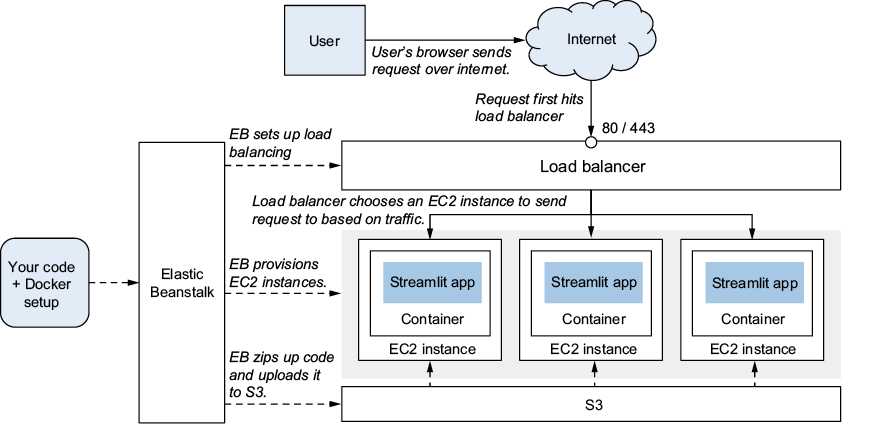
Use the architecture figure to follow a request from the browser through the load balancer and EC2 instance to the Dockerized application. section 12.3.3


