appsettings.Development.json is an optional JSON configuration file for an ASP.NET Core app’s Development environment. It sits beside appsettings.json and supplies runtime settings for local development. section 3.4 section 10.4.2
The configuration system uses the file as an environment-specific layer:
- Loads appsettings.json first, then loads the optional file whose name matches the current environment. section 10.4.2
- Overrides values from appsettings.json when both files contain the same key. section 10.4.2
- Supports development-only behavior such as more verbose logging, while staging and production can use their own environment-specific files. section 10.4.2
- Can be combined with development-only providers such as User Secrets instead of placing sensitive values in the JSON file. section 10.4.2
How the file is selected
WebApplicationBuilder uses the current EnvironmentName to add an optional file such as appsettings.Development.json after appsettings.json. A custom setup can make the base file compulsory and the environment-specific file optional.
Figure 3.7 Solution Explorer and folder on disk for a new ASP.NET Core application. Solution Explorer also displays the Connected Services and Dependencies nodes, which list NuGet and other dependencies, though the folders themselves don’t exist on disk.
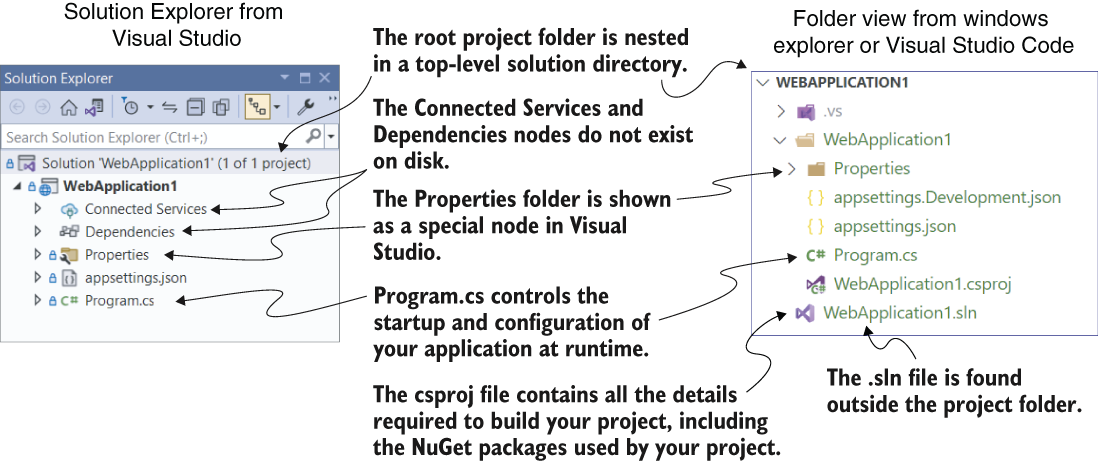
Use the project-layout figure to locate appsettings.json and appsettings.Development.json in the project root. section 3.4


