An architecture diagram is a formal concept map of a software system. Its tree-like structure contains no cycles or separate elements, and records important subsystems, relationships, and concrete choices about libraries, interfaces, and modules. section 3.2.3
Use it as a graphical roadmap rather than a complete description of every design idea. It can grow from an elements diagram, while iterative development allows the diagram itself to be revised. section 3.2.3 section 3.4
A useful diagram makes several design commitments visible:
- Represent each component with its implementation in a component-description block. section 3.2.3
- Connect components with directional “uses” relations or bidirectional “interacts with” relations. section 3.2.3
- Show architectural layers, subsystem boundaries, interfaces, and implementation technologies. section 3.2.3 section 3.4
Andromeda Control Software
A diagram for the control software shows a central layer connecting the others, a presentation layer using Qt, business logic, and a relational database. Another component depicts an interoperability bus implemented with an unnamed FRP library; its impure implementation includes Monad.IO and database and GUI accessors. section 3.2.3
Figure 3.13 Architecture diagram for the Andromeda Control Software
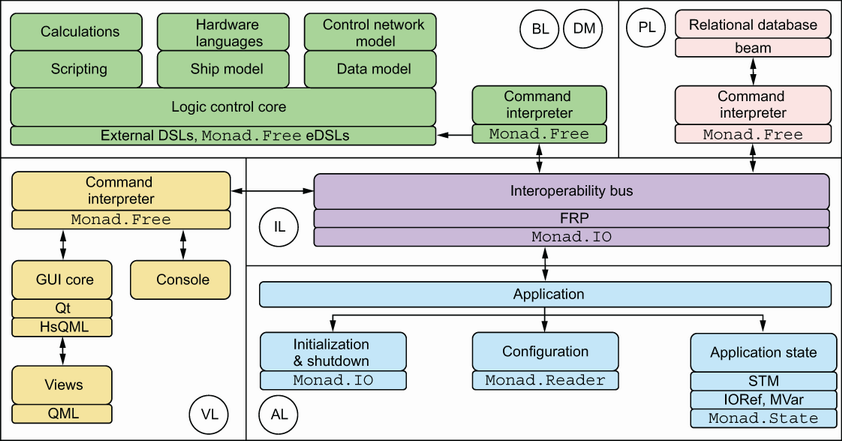
Inspect the architecture diagram for Andromeda Control Software to see how layers, components, and implementation decisions are arranged. section 3.2.3
