An ARP table is a host-maintained list that associates IP addresses with corresponding MAC addresses. It lets an end host or router encapsulate packets in Ethernet frames addressed to the correct destination, without sending an ARP request before every packet. section 6.4 section 6.6
An ARP exchange builds entries as follows:
- A device broadcasts an ARP request when it knows an IP address but not the corresponding MAC address. section 6.4
- The device owning that IP address sends a unicast ARP reply with its MAC address. section 6.6
- Both devices can add an entry for the other device, while switches separately learn MAC addresses in their MAC address tables. section 6.4 section 10.1.1
Sending traffic through a default gateway
PC1 uses ARP to learn R1 G0/1’s MAC address at 192.168.1.1. PC1 then places a packet for a remote host inside a frame addressed to the router’s MAC address. R1 likewise uses ARP to learn the next hop or destination host’s MAC address. section 10.1.1 section 10.3
Figure 10.2 PC1 uses ARP to learn R1 G0/1’s MAC address. (1) PC1 sends an ARP request to 192.168.1.1. SW1 learns PC1’s MAC address and floods the frame due to the destination MAC address of ffff.ffff.ffff. (2) After receiving the ARP request, R1 adds an ARP table entry associating IP address 192.168.1.11 with PC1’s MAC address. R1 then sends an ARP reply to PC1. SW1 learns R1 G0/1’s MAC address and forwards the frame to PC1. (3) After receiving the ARP reply, PC1 adds an ARP table entry associating IP address 192.168.1.1 with R1 G0/1’s MAC address.
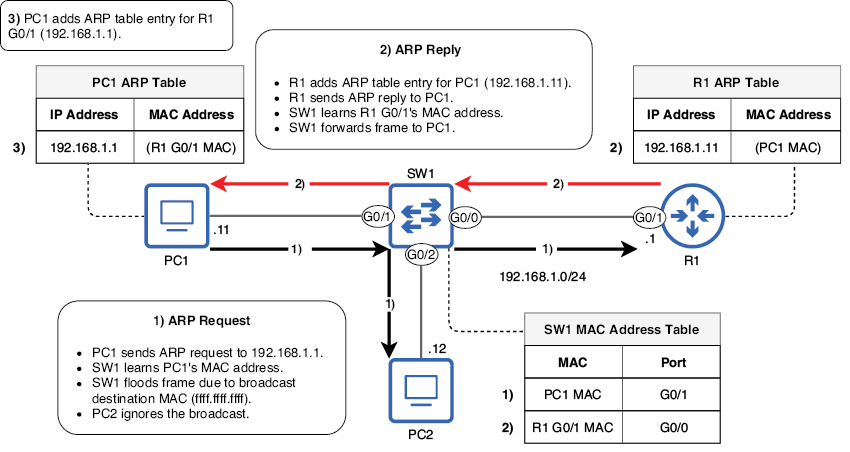
Follow the three-step exchange in which PC1 requests R1’s MAC address, R1 records PC1’s mapping, and PC1 records R1’s mapping. section 10.1.1
