An ARP request is a broadcast protocol message that asks the host using a specified IP address to provide its MAC address. Hosts use it when they need to place an IP packet inside an Ethernet frame but do not yet know the required destination MAC address. section 6.4 section 9.1
An ARP request exchange works as follows:
- The sender addresses the Ethernet frame to the broadcast MAC address ffff.ffff.ffff, so switches flood it throughout the broadcast domain. section 6.4
- Every host examines the requested IP address; hosts whose IP address does not match discard the request. section 6.4
- The host using the requested IP address sends an ARP reply as a unicast frame to the requester. section 6.4
- Both devices can add IP-to-MAC mappings to their ARP tables, preventing a new request before every packet. section 6.6 section 10.3
Local and remote destinations
When PC1 sends to PC3 on the same network, it requests PC3’s MAC address. When PC1 sends to a different network, it requests its default gateway’s MAC address instead. Each router then uses ARP for the next hop, and the final router uses ARP for the destination host. section 9.1 section 10.1.2 section 10.1.4
Figure 10.2 PC1 uses ARP to learn R1 G0/1’s MAC address. (1) PC1 sends an ARP request to 192.168.1.1. SW1 learns PC1’s MAC address and floods the frame due to the destination MAC address of ffff.ffff.ffff. (2) After receiving the ARP request, R1 adds an ARP table entry associating IP address 192.168.1.11 with PC1’s MAC address. R1 then sends an ARP reply to PC1. SW1 learns R1 G0/1’s MAC address and forwards the frame to PC1. (3) After receiving the ARP reply, PC1 adds an ARP table entry associating IP address 192.168.1.1 with R1 G0/1’s MAC address.
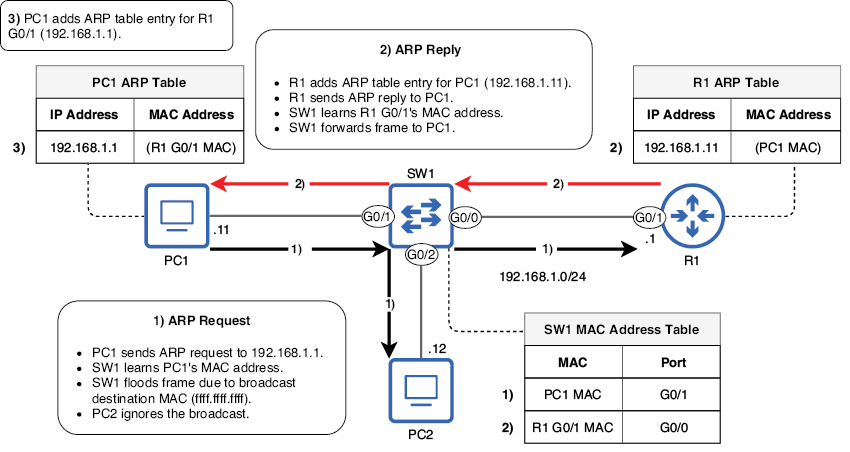
Follow PC1’s request for 192.168.1.1: SW1 floods the broadcast, R1 replies, and both devices create ARP table entries. section 10.1.1
