An artifact is a standalone deliverable Claude generates from a conversation. Unlike an inline reply, it can be viewed or downloaded separately from the chat. Ask for an artifact explicitly, including the format you want, or describe the output and let Claude choose how to produce it. section 2.5.2
Draft an architecture document
After discussing a system design, ask Claude to draft it as an artifact. Review the result, then request specific changes—for example, expand the summary, tidy the original sketch, and reorder the diagram, service breakdown, data flows, and technology stack. Download the draft when it is useful, but revise it yourself and check that the decisions and details are adequately documented. section 1.5.1
Manage artifacts in the Claude web interface:
- Open the document icon to view all artifacts or download them together. View an individual artifact alongside the chat, download it, or open it in the relevant app. section 2.5.2
- Inspect the source of artifacts with code and view versions created through iteration. Share an artifact with colleagues on a team plan or make it public. section 2.5.2
Figure 2.3 Managing artifacts in the Claude web interface
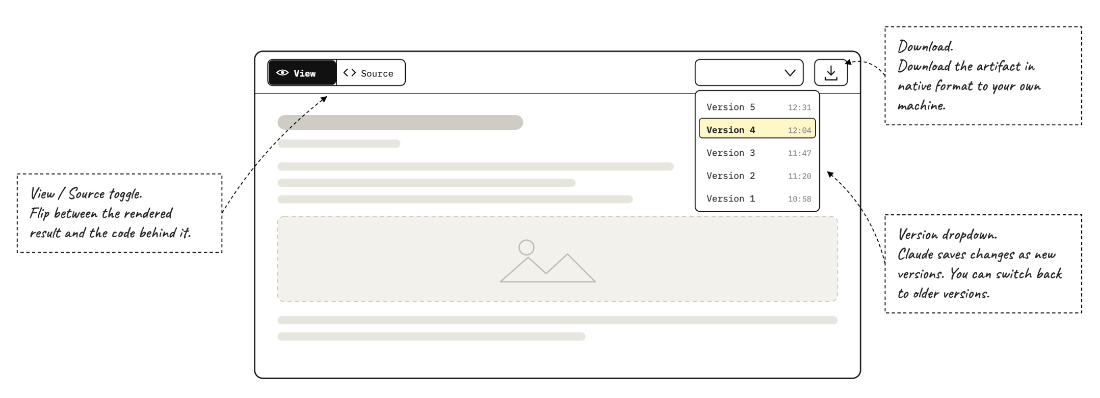
See where artifacts appear and how they are managed in the web interface. section 2.5.2
An interactive artifact is a miniature web app that runs inside the chat in a sandbox with limited access. It can use Claude through the API and is useful for quick prototypes or small functional apps, such as quizzes. The web interface is not a collaborative workspace for editing its code, so it is not the place for building large applications. section 2.5.2
Create a structured RFC
Choose a design decision from a conversation and ask: “Let’s write that up as a Markdown artifact using the Kubernetes Enhancement Proposal format.” Supply example proposals or upload your own templates to guide the structure. Review the generated document rather than assuming that a thorough draft is ready to use. section 2.6.1 section 2.9
