The ASP.NET Core Module connects IIS with an ASP.NET Core application. It lets IIS act as a reverse proxy, forwarding incoming requests to the application and returning its responses. Install it through the ASP.NET Core Windows Hosting Bundle, which also supplies the .NET Runtime and ASP.NET Core Runtime. section 27.2.1 section 27.5
Prepare IIS and the application in this order:
- Install the Windows Hosting Bundle on the IIS machine, including development machines that run IIS. section 27.2.1
- Create an IIS application pool with .NET CLR set to No Managed Code; the native module starts the .NET runtime itself. section 27.2.1
- Add the IIS website, point it to the published application folder, select the No Managed Code pool, and grant that pool access to the folder. section 27.2.1
- Publish the application and deploy the generated web.config with the application files; this file defines how IIS runs the application. section 27.2.2 section 27.5
WebApplicationBuilder adds IIS integration automatically. Custom builders must call UseIIS() for in-process hosting or UseIISIntegration() for out-of-process hosting. In-process hosting runs the application inside the IIS process and avoids interprocess communication; out-of-process hosting runs it separately and can help with troubleshooting. section 27.2.2 section 27.5
Publishing for IIS
Run `dotnet publish --output publish_folder --configuration Release`, then configure IIS to serve the resulting folder. The published output contains the application DLL, dependencies, and web.config needed for IIS hosting. section 27.2.2 section 27.5
Figure 27.5 Creating an app pool in IIS for your ASP.NET Core app. The .NET CLR version should be set to No Managed Code.
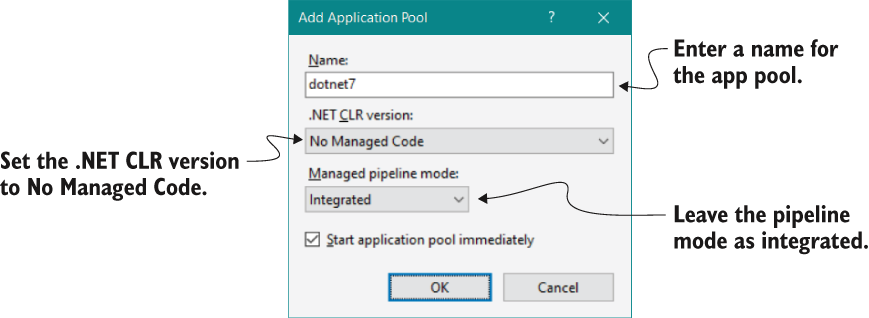
Use the IIS application-pool configuration figure to verify that the pool uses No Managed Code. section 27.2.1
