The ASP.NET Core Windows Hosting Bundle prepares Windows and IIS to run ASP.NET Core applications. It installs the .NET Runtime, ASP.NET Core Runtime, and IIS AspNetCore Module, which connects IIS to the application as a reverse proxy. section 27.2.1 section 27.5
Use the bundle when:
- Hosting an ASP.NET Core application behind IIS on Windows. section 27.2.1
- Running IIS on a development machine; missing components can produce confusing IIS errors. section 27.2.1
- Deploying framework-dependent or self-contained applications; the IIS AspNetCore Module is still required for IIS hosting. section 27.2.1
Basic IIS setup
Install the bundle, create an IIS application pool with .NET CLR set to No Managed Code, and add a website pointing to the published application folder. Deploy the generated web.config with the application files, then grant the pool identity access to that folder. section 27.2.1 section 27.5
Figure 27.5 Creating an app pool in IIS for your ASP.NET Core app. The .NET CLR version should be set to No Managed Code.
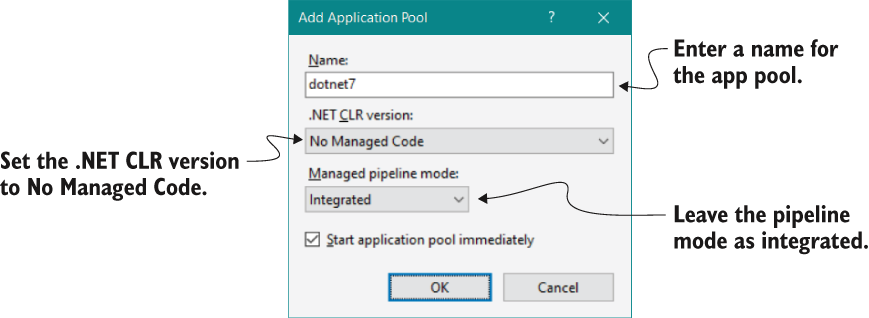
Use the IIS application-pool figure to verify that the pool uses No Managed Code. section 27.2.1
