The ASP.NET Core Runtime provides what a published ASP.NET Core application needs to run after building is complete. A runtime-dependent deployment requires the .NET Runtime and ASP.NET Core Runtime on the host. section 27.5 section 27.2.1
Prepare the runtime according to the hosting environment:
- Install the ASP.NET Core Windows Hosting Bundle for IIS on Windows; it includes the .NET Runtime, ASP.NET Core Runtime, and IIS AspNetCore Module. section 27.2.1
- Install only the .NET Runtime and ASP.NET Core Runtime for runtime-dependent applications hosted on Linux, macOS, or outside IIS. section 27.2.1
- Install the IIS AspNetCore Module when IIS acts as a reverse proxy, including when the application uses a self-contained deployment. section 27.2.1
Running a published application
Run dotnet publish to create the application DLL and dependencies, then run the published application with dotnet app.dll. IIS hosting additionally requires the runtime, AspNetCore Module, published web.config, and a No Managed Code application pool. section 27.5 section 27.2.1
Figure 27.5 Creating an app pool in IIS for your ASP.NET Core app. The .NET CLR version should be set to No Managed Code.
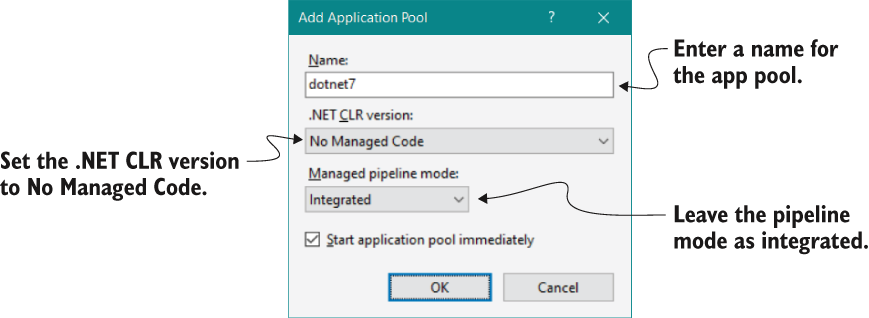
Use the IIS app-pool figure to verify that the application pool uses No Managed Code. section 27.2.1
