An assistive system puts information and advice in front of a person without controlling the resulting decision. It may summarize data, offer predictions, or make a large body of information easier to inspect. Its value depends on people being able to examine the output and use their own judgment. section 9.2.1
Choose this pattern deliberately rather than calling any human-facing AI system assistive. A social-network feed can look helpful while its algorithms decide which content users see—and which they do not. That is a different allocation of control, with different requirements. section 9.2.3 section 9.11
Figure 9.2 A simple dashboard on the left versus an intelligent model-driven dashboard on the right
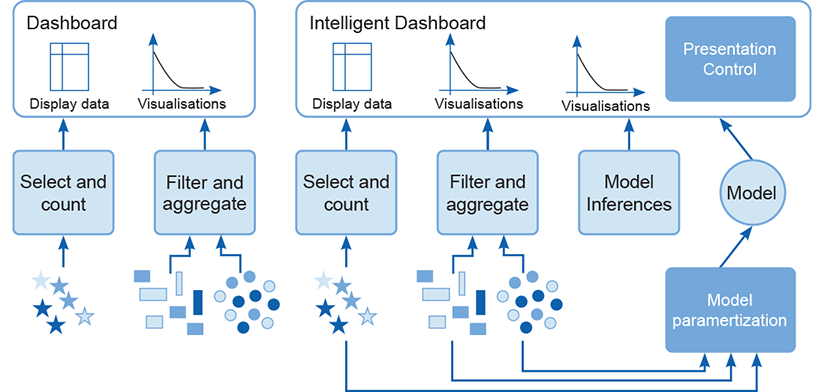
Compare a conventional dashboard with an intelligent one. The latter adds model-derived information to the visualizations a person inspects before deciding what to do. section 9.2.1
A dashboard is a common assistive interface: it gathers visualizations relevant to a business problem for rapid inspection. A conventional dashboard transforms and displays data with aggregates and selection filters. An intelligent dashboard also uses model output, such as predictions or filters that remove outliers or noise. A customer-churn model, for example, can produce predictions based on user-selected values. section 9.2.1
Plan an intelligent dashboard
For a bike-shop application, settle the system-type decision with the team, then review its nonfunctional impact. Prototype the interface in a development environment while designing the model server and data pipeline. Sketch data flows from production databases and cloud data sources, and plan where transformations and feature creation will run. Bring the design back for review before treating the prototype as a production system. section 9.10
Before release, turn the assistive choice into explicit delivery checks:
- Specify the functional and nonfunctional requirements, including the user interface and controls available to users. section 9.11
- Provide production data flows, model serving, logging, monitoring, and alerting so support teams can accept the service. section 9.11
- Allow for user and integration testing, production sign-off, ethical review, and continuing work after release. section 9.11
