Asymmetrical balance arranges elements with unequal visual weight so the composition still feels balanced overall. Unlike symmetry, it can make a layout more interesting and help users’ eyes scan across multiple pieces of content rather than stopping at one focal point. section 2.1.5
Use asymmetrical balance by checking how visual weight moves through the layout:
- Pair heavy elements, such as large images, strong colors, or oversized logos, with text, whitespace, or other columns that counter their weight. section 2.1.5
- Use a grid to distribute unequal areas deliberately rather than allowing one side to become unintentionally dominant. section 2.1.5
- Check whether whitespace supports balance; excessive empty space on one side can make an asymmetrical composition feel unstable. section 2.1.5
A balanced landing page
The Whitehead Institute landing page places white text in the lower-left area and a large cropped logo on the right. The logo’s size, color, and position counter the text and surrounding space, creating balance without mirroring the composition. A related section uses one 50-percent column balanced by two 25-percent columns. section 2.1.5
Figure 2.44 The Whitehead Institute’s landing page is asymmetrical, but the two primary elements capture our focus and create a sense of balance. (Courtesy of Whitehead Institute, https://wi.mit.edu/)
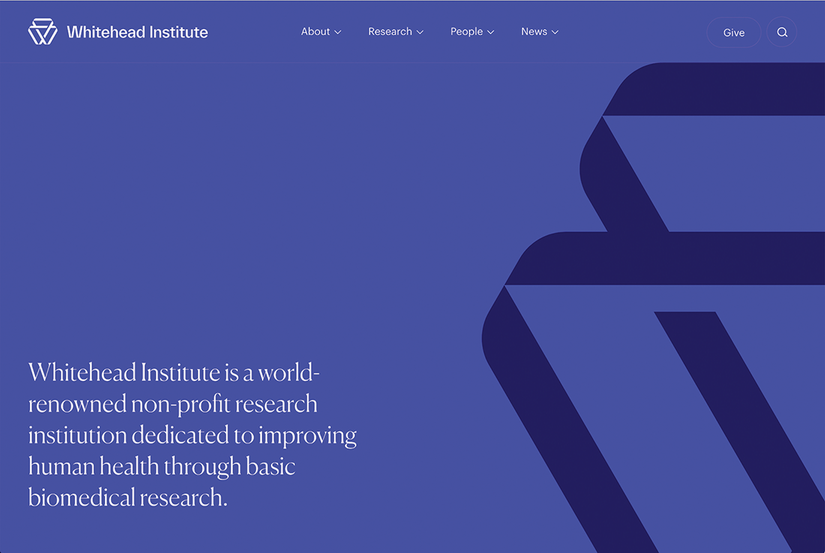
Compare the two primary elements and observe how unequal size, placement, and color create visual balance. section 2.1.5
