The rule of thirds is a practical way to give a web page or image stronger, less rigid balance. It helps establish a focal point—the element viewers notice first—and guides their eyes toward the page’s main subject. Rather than centering everything, place the important visual or brief hero headline off-center so the composition feels more active and engaging. section 6.7.1 section 6.8 section 6.8.4
Imagine two equally spaced horizontal lines and two equally spaced vertical lines laid over an image. They divide the frame into nine equal parts and create four intersection points. Use those intersections, or the grid lines themselves, as likely homes for a focal point. A photograph, painting, hero image, or page layout can all use the same grid. section 6.8 section 6.8.1 section 6.8.2
Use the rule of thirds when refining a hero image or other important visual:
- Choose the subject that should attract attention first. It might be the brightest, largest, most detailed, or most striking part of the image. section 6.7.1
- Open the image’s crop tool and display its grid. Photo editors such as Photoshop, Paint.NET, and GIMP provide cropping tools. section 6.8.1
- Drag the crop handles until the main subject sits on a grid intersection or along a grid line. If there are several focal points, try placing more than one near intersections. section 6.8.2 section 6.8.1
- Compare several crops. Check that the new frame still has a pleasing shape and that it makes the intended subject clear. section 6.8.2
- Keep the result purposeful rather than mechanical. The grid is a guide for balance and emphasis, not a demand for a perfectly symmetrical layout. section 6.7.1 section 6.8.4
Reframe a landscape around its subject
For a farmhouse in a broad valley, treat the lightest area of the farmhouse as the focal point. Resize the crop grid so a lower intersection lands on the farmhouse, trimming some sky or edge area as needed. The revised image makes the farmhouse the first thing viewers see, with the valley becoming supporting context. Test a wider crop afterward if the first result feels too portrait-shaped for the scene. section 6.8.2
Cropping trims edges, so it can reframe an existing image, change its aspect ratio, and move a subject onto the grid. Outpainting offers the opposite option: extend one or more edges with AI-generated visual content, then use the expanded frame to reposition the focal point. This can preserve more of the original scene while creating room for a better composition. section 6.8.1 section 7.8
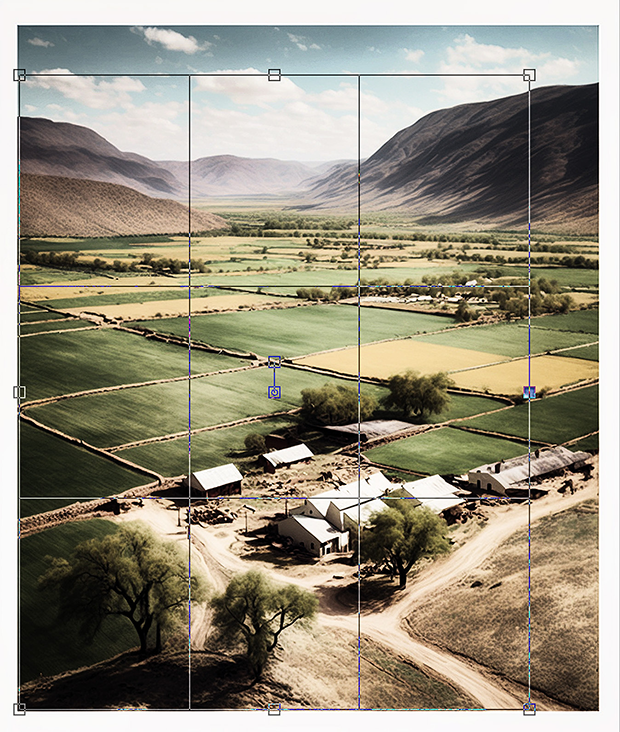
The overlay shows a crop grid resized until its lower-right intersection falls directly on the farmhouse, making the placement decision visible. section 6.8.2
The rule works because viewers tend to look toward the grid’s intersections rather than beginning at the exact center. Centering a subject can make an image feel static; an off-center placement often adds energy. Still, compare the result with your page’s message and surrounding content. A balanced design should support what visitors need to notice, not merely follow a grid. section 6.8.4 section 6.7.1
