A focal point is the area a viewer notices first. In a web page, it starts the eye’s path through the layout, so make it support the message you want visitors to receive. It may be the largest, brightest, most detailed, or most surprising area. On a home page, this prominent element is often called the hero: usually an image, or a brief headline. section 6.7.1
Choose a focal point before arranging the rest of the composition. Its color, type, shapes, and other qualities can echo through the page to create visual cohesion. Balance the surrounding content without relying on exact symmetry, which can make a page feel static. section 6.7.1
Strengthen a focal point with a practical composition check:
- Decide what should dominate: a subject, product, headline, or key visual. section 6.7.1
- Use the rule of thirds grid: place the point of interest on a grid line or, when possible, one of its four intersections. section 6.8.1 section 6.8.2
- Crop the image by dragging the crop handles until the subject gains emphasis; then check whether the new framing still has a suitable aspect ratio. section 6.8.1 section 6.8.2
- Compare alternate crops and select the one that best balances the subject with its context rather than accepting an AI suggestion automatically. section 6.8.3
A farmhouse becomes the subject
To make a farmhouse the clear subject of a landscape, move a rule-of-thirds intersection onto its lightest area and crop away some sky and edge content. The viewer’s eye reaches the farmhouse first, then the valley; the result has stronger balance and depth. section 6.8.2
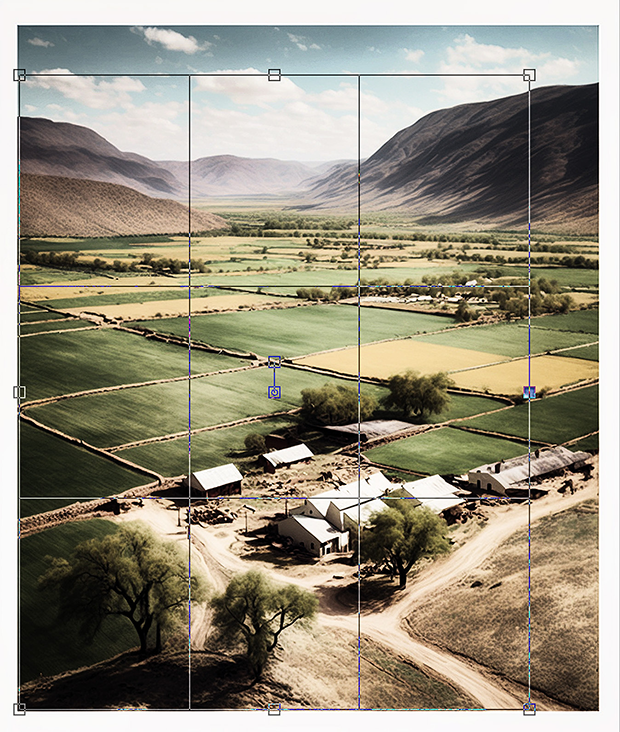
Use the resizable grid to see how placing a subject on an intersection changes its visual priority before committing to a crop. section 6.8.2
