The CSS auto keyword lets the relevant layout algorithm determine a size from content and available space. Its behavior depends on where it appears: grid tracks use content requirements, while automatic margins can center a constrained element. section 2.3.3 section 4.5.3
Common layout uses include:
- Set auto as a grid track minimum so the track is at least as wide as its contained element. section 2.3.3
- Use auto as a grid track maximum to make the track behave like max-content, matching the space required by its content. section 2.3.3
- Combine max-width with left and right auto margins to center a layout when the viewport exceeds its maximum width. section 4.5.3
- Use margin: auto to center a fixed-height, maximum-width card horizontally in the browser window. section 9.2
Constrain and center a page
html { background-color: #f9f7f1; } body { max-width: 1200px; margin: 0 auto; } The maximum width prevents an extra-wide page from becoming difficult to read, while the automatic margins center it. Moving the background color to html prevents white bands outside the constrained body. section 4.5.3
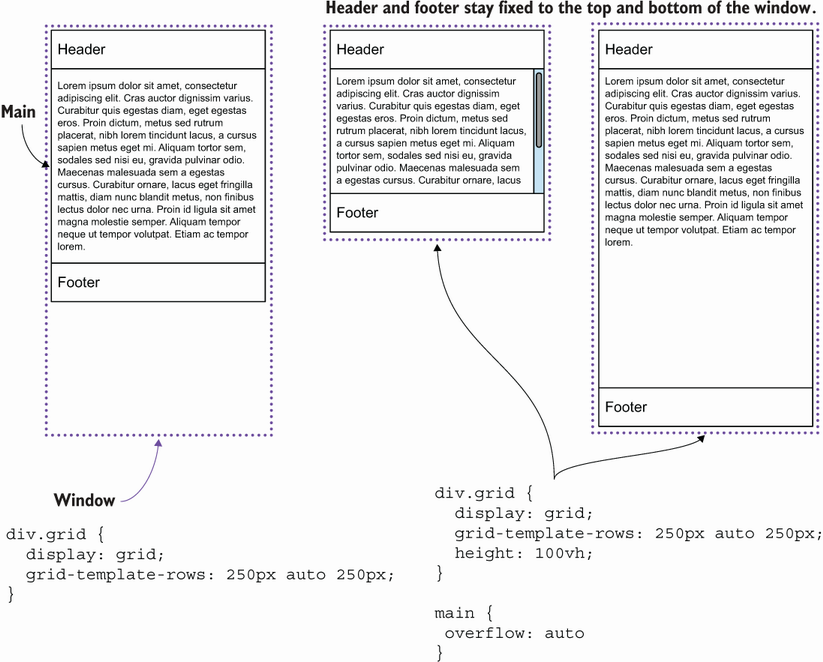
Compare fixed-header and fixed-footer layouts in which an overflow area grows and shrinks with the window. section 2.3.3



