AWS Certificate Manager (ACM) helps secure an AWS-hosted app with HTTPS on a custom domain. It requests a trusted digital certificate, verifies domain ownership, and can renew the certificate automatically. section 12.3.1 section 12.4.2
Set up a public certificate with these choices:
- Request a public certificate for the app’s fully qualified domain name, such as www.factfrenzyapp.com. section 12.4.2
- Choose DNS validation and RSA 2048, then wait while the certificate remains pending validation. section 12.4.2
- Copy ACM’s CNAME records into the domain’s DNS configuration to prove ownership. section 12.4.2
- For an Elastic Beanstalk app, add a load-balancer listener on port 443 and attach the issued certificate. section 12.6
Figure 12.10 Options to choose while requesting a certificate in ACM.
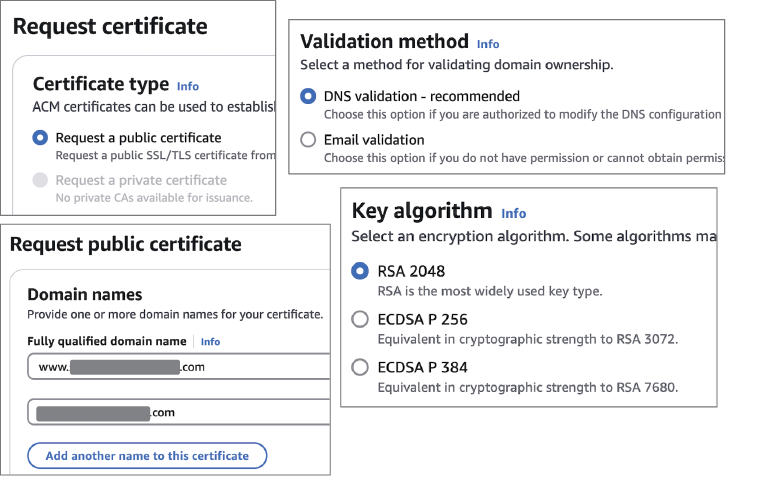
Use the request-options view to check the public certificate, domain, validation method, and key algorithm before submitting. section 12.4.2
Figure 12.11 ACM shows CNAME records to add to your domain’s DNS to prove ownership.
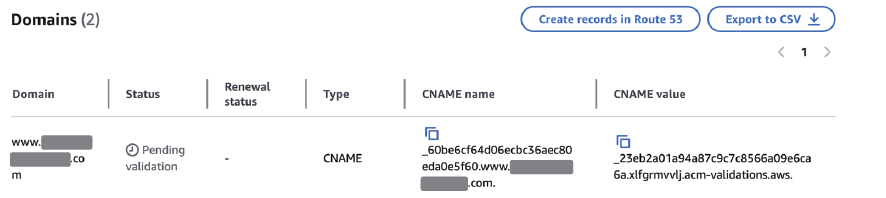
Use the DNS-validation view to locate the CNAME records that must be added to the domain configuration. section 12.4.2
