A Streamlit app that works locally may need a more dependable public home, more control over its environment, or a custom domain. AWS Elastic Beanstalk is a platform-as-a-service option between simple hosting and configuring AWS infrastructure yourself. It deploys and manages web apps while handling provisioning, scaling, and deployment across underlying AWS services. section 12.0 section 12.1.2
Without Elastic Beanstalk, hosting on AWS could mean setting up EC2 instances, installing Docker, configuring networking and a load balancer, and monitoring the app yourself. Elastic Beanstalk coordinates those pieces but still lets you customize the environment. For a Streamlit app, check WebSocket support when comparing hosting platforms: Streamlit depends on it. section 12.3.2 section 12.1.2
Figure 12.4 The end state of the deployed Streamlit app on AWS
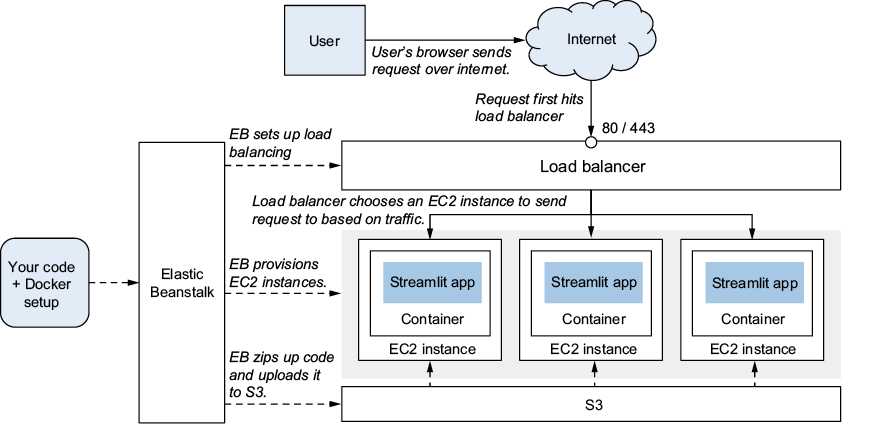
Use the deployment diagram to follow a browser request through the load balancer to an EC2 instance and its Docker container, then back to the browser. section 12.3.3
On an instance, the Streamlit app runs inside a container built from its Dockerfile, much as it does locally. Elastic Beanstalk provisions the instances, storage, Docker environment, load balancer, and networking; it also monitors health and replaces failed instances. A request reaches the load balancer first, which forwards it to an instance running the app. section 12.3.3
To move a locally running Dockerized app into an Elastic Beanstalk environment:
- Prepare cloud-specific configuration. A local Docker Compose mount of the .streamlit directory will not work when you cannot place that directory directly on the host. Use a .ebextensions configuration file to create the needed secrets.toml on the instance, and update the container’s volume mapping. section 12.3.5
- Run eb init from the app directory. Its guided setup asks for a region, AWS credentials, an application name, and a platform choice. An application can group environments such as staging and production. section 12.3.6
- Run eb create to deploy to an environment. After changing the app, run eb deploy to send a new version to the running environment. section 12.3.6
From local container to public URL
A sample setup selects the Docker platform, creates a production environment, and receives an elasticbeanstalk.com address after deployment. The deployment output shows an application archive uploaded to S3 and a new version deployed to EC2 instances. That URL makes the app reachable; a custom domain and HTTPS are separate finishing steps. section 12.3.6 section 12.1.3
Elastic Beanstalk reduces the work of assembling AWS services, not the need to make deployment choices. Region affects response time; credentials and service permissions control what can be deployed; and the app’s secrets and container configuration must fit the hosted environment. For a custom domain with HTTPS, the setup also uses AWS Certificate Manager and a load-balancer listener on port 443. section 12.3.6 section 12.6
