AWS Elastic Load Balancing (ELB) provides managed load balancers that sit between clients and application targets. A browser sends its request to the load balancer, which forwards it to a target and returns the response. Clients need to know the load balancer, not the individual web servers. This is synchronous decoupling: the client still waits for an immediate response. section 14.0 section 14.1
Choose a load balancer type for the traffic it must handle:
- Application Load Balancer (ALB) supports HTTP and HTTPS. Use it when those protocols are all the application needs. section 14.1
- Network Load Balancer (NLB) supports TCP and TCP TLS. Use it when an ALB does not fit the protocol. section 14.1
- Classic Load Balancer (CLB) supports HTTP, HTTPS, TCP, and TCP TLS, but is treated as deprecated. section 14.1
Two-server WordPress deployment
Put an ALB in front of two EC2 virtual machines running WordPress. Expose the load balancer rather than the web servers to clients; a security group can allow internet HTTP traffic to port 80 of the load balancer. Health checks determine whether a machine receives requests. If one fails, the load balancer stops sending it traffic, and the other must handle requests until the failed machine is replaced. The servers can share application files through EFS and use RDS for MySQL. section 2.1 section 14.1
Figure 2.1 The company’s blogging infrastructure consists of two load-balanced web servers running WordPress, a network filesystem, and a MySQL database server.
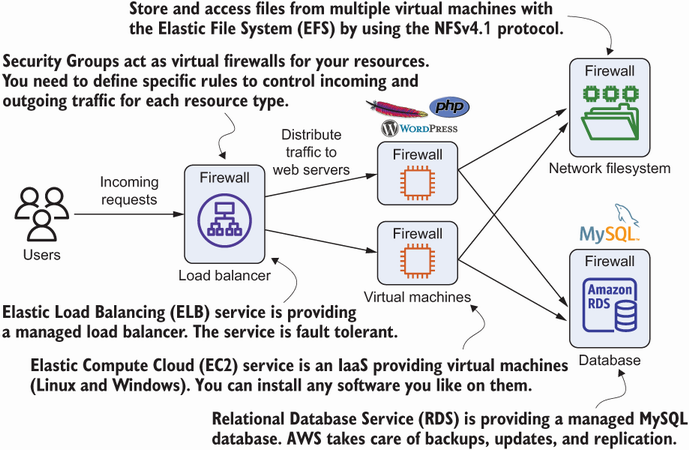
The diagram places the load balancer ahead of two WordPress servers and shows their shared filesystem and database. section 2.1
ELB load balancers are fault tolerant and scalable, but a load balancer cannot make a single EC2 instance fault tolerant. Use redundant instances; Auto Scaling groups can maintain a fleet. Health checks keep an unready backend out of service, but surviving targets still need enough capacity. Manage load balancers in the EC2 Management Console. Unlike SQS, ELB does not make a request asynchronous: the target must be available to answer it. section 14.1 section 16.0 section 14.3
