Azure is Microsoft’s cloud computing platform: services for computing, networking, storage, and more, available over the internet. It lets you build and run applications without buying or maintaining physical servers. A small website, a data backup, and a large-scale application can all start with the same basic idea: use the resources you need, then adjust as needs change. section 1.0
The choice of service determines what you manage. With infrastructure as a service (IaaS), you rent computing, networking, and storage while Azure abstracts the physical hardware. Platform as a service (PaaS) also takes on operating-system and maintenance tasks. Software as a service (SaaS) leaves you mainly to use the hosted software. Less server upkeep sounds lovely, but you still need to choose the right service for the job. section 1.1
Figure 1.2 Cloud computing abstraction layers. The responsibility shifts between you and the cloud provider across IaaS, PaaS, and SaaS. As you move up the layers, the provider manages more—from physical infrastructure and virtualization in IaaS, to the OS and runtime in PaaS, and nearly everything in SaaS—leaving you to focus on just your applications and data.
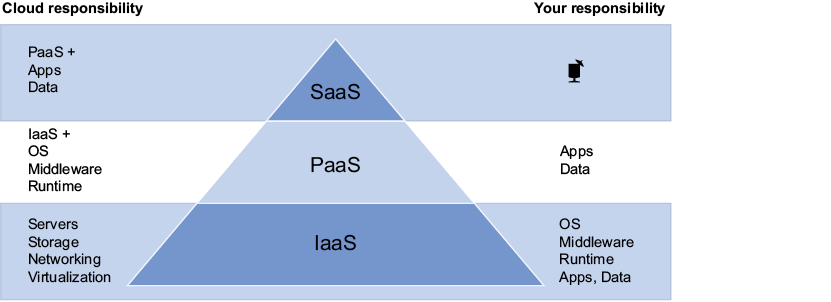
The diagram shows how responsibility shifts from you to the provider across IaaS, PaaS, and SaaS. section 1.1
Why use Azure rather than add another server in the office?
- Scale for demand: App Services and Virtual Machine Scale Sets can autoscale using workload thresholds and minimum and maximum instance counts. section 1.3.1
- Plan for failures: paired regions, availability zones, and replicated Azure Storage support reliability, though the appropriate design still needs to be chosen. section 1.3.2
- Expand without buying hardware: services can help with load balancing, file replication, identity integration, and Kubernetes clusters. section 1.3.3
- Manage spending rather than assume cloud is automatically cheap: pay-as-you-go services, reserved virtual machines, Spot VM pricing, and some free tiers offer different options. section 1.8
A website with a busy season
An on-premises web server has a traffic limit set by its CPU, memory, and network connection. Instead of buying enough hardware for the busiest day and leaving it idle afterward, an Azure deployment can use autoscaling thresholds to adjust capacity. Estimate both normal and peak traffic before setting the limits. section 1.3.1
Choose a region near users to reduce latency, while checking service availability and relevant data-residency needs. Azure’s compliance certifications can help regulated organizations, but they do not replace decisions about how to deploy and operate an application. section 1.0 section 1.3.5
To get started, create an Azure account and sign in to the Azure Portal. The portal provides a visual way to create resources, inspect invoices and logs, set alerts, and manage users. The CLI, PowerShell, and Azure SDKs offer other ways to interact with Azure; these tools pass through Azure Resource Manager. Account signup requires identity verification and a valid credit card, even when starting with a free account. section 1.6.1 section 1.6 section 1.7 section 1.8


