Azure Bastion is a fully managed PaaS bastion host for secure RDP and SSH access to Azure VMs. It sits between the internet and VMs in a virtual network, avoiding public exposure of VM RDP and SSH ports, which reduces port scanning and brute-force risk. Microsoft manages host hardening and vulnerability updates, removing the effort of operating a self-managed jump server. section 4.2 section 4.10
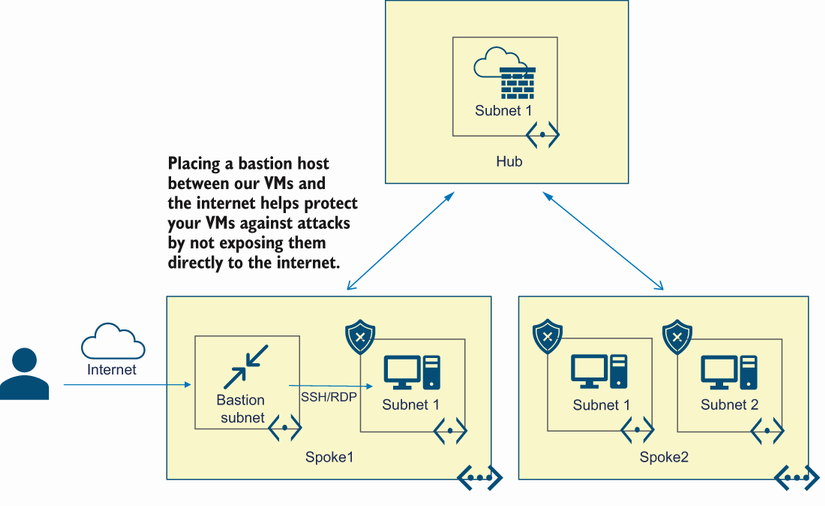
Use the topology to see Bastion placed at the network perimeter, providing a controlled path to VMs in a hub-and-spoke environment. section 4.2
Deploy Bastion with infrastructure sized for the required session capacity:
- Create a dedicated subnet named AzureBastionSubnet in the same VNet and resource group. It cannot contain other resources; use /26 or larger when host scaling is needed. section 4.2.2
- Create a Standard SKU public IP address, then create the Bastion resource against that IP and the VNet containing AzureBastionSubnet. section 4.2.2
- Choose Basic for core Linux SSH and Windows RDP connectivity. Choose Standard for advanced protocol choices, Key Vault private keys, file transfer, copy-paste control, and selectable instance scaling. section 4.2.1 section 4.2.2
Create the network foundation
Use Azure CLI to create a VNet and an AzureBastionSubnet, then provision a Standard public IP and create the Bastion host. The deployment output confirms provisioning state, SKU, scale units, and enabled capabilities. section 4.2.2 section 4.2.2
Browser-based access is agentless: select a VM in the Azure portal, open Bastion, choose RDP or SSH, supply the port and authentication details, and connect over TLS. It requires Reader access to Bastion, the VM, and its NIC; a peered-VNet deployment also requires Reader access to that VNet. section 4.2.3 section 4.7
Native RDP and SSH clients require Standard SKU and Native Client Support. Enable tunneling with az network bastion update --enable-tunneling, then use az network bastion rdp or ssh with the target VM resource ID. Native connections also require appropriate Reader roles, VM login roles when Microsoft Entra ID login is enabled, and the relevant inbound VM port. section 4.2.4 section 4.2.4

