liveBook · Manning

Azure Bastion

As explained in Microsoft Azure in Action

Azure Bastion is a managed Azure service that provides secure browser-based access to virtual machines through an Azure virtual network without exposing them directly to the public internet.

A virtual machine (VM) needs remote access, but opening it to the public internet creates an avoidable security risk. Azure Bastion lets you connect through an Azure virtual network (VNet) without giving the VM a public IP address. It supports browser-based Remote Desktop Protocol (RDP) and Secure Shell (SSH) access. section 3.5.4 section 4.6

For a Windows VM, go to the VM in the Azure portal and choose Bastion. The RDP desktop opens in your browser, so you can work much as you would in a normal remote desktop session. The practical catch: you cannot copy files directly from your local machine to the VM this way. A cloud storage service such as OneDrive can provide another route for files. section 3.5.4

Figure 3.32 Connect to the VM only using the Azure network.
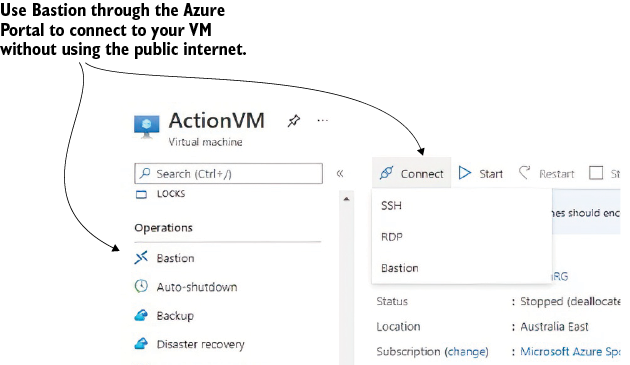
Shows the portal connection path for reaching a VM through the Azure network. section 3.5.4

Choose among RDP, SSH, and Bastion based on the VM and how much exposure you can allow. Bastion is especially useful when you want remote access without opening the VM to the public internet; it is one part of securing a VM, not a replacement for the other layers of defense. section 3.8 section 6.1.1


How Microsoft Azure in Action covers it

How deep it goes
Explains the portal-to-browser RDP workflow and a file-transfer limitation, but does not detail Bastion setup or network internals.
Examples
Shows a portal Bastion connection that opens a VM desktop in the browser and suggests OneDrive for moving files.
What it assumes
Assumes a VM to connect to while introducing RDP, SSH, and VNets as remote-access concepts.
What you can do after
Operate/configure it by choosing Bastion from a VM’s Azure portal menu to open a browser-based RDP session.
How it connects
Connects virtual machines and virtual networks with RDP, SSH, public IP addresses, and defense in depth.

Also explained in

Compare how 2 books explain Azure Bastion →

Related concepts

This explainer was generated by Manning's knowledge graph from the text of Microsoft Azure in Action. The section links point to the parts of the book it draws on.