Azure Portal is the browser-based workspace for creating, configuring, locating, monitoring, and deleting Azure resources. A practical workflow starts by signing in, selecting Create a Resource, searching for a service, entering its settings, and reviewing the deployment. section 3.9.1 section 6.9
Use the portal to:
- Create a private container registry with a globally unique name that determines its Azure Container Registry URL. section 3.9.1
- Choose or create resource groups to organize related cloud resources such as registries and Kubernetes clusters. section 6.9
- Create a managed Kubernetes cluster by selecting Kubernetes Service, choosing a subscription and location, and recording its resource-group and cluster names. section 6.9
- Find resources through All Resources, inspect registry details, and delete unused infrastructure to control trial-credit or subscription costs. section 3.9.4 section 7.9.6
Create a registry for a containerized microservice
Open the portal, choose Create a Resource, search for container registry, select Container Registry by Microsoft, and configure the registry. A name such as bmdk1 produces a URL such as bmdk1.azurecr.io; record it for later Docker commands. After deployment, locate the registry in All Resources and inspect its authentication details. The same registry can later support deployment to Kubernetes. section 3.9.1 section 6.9
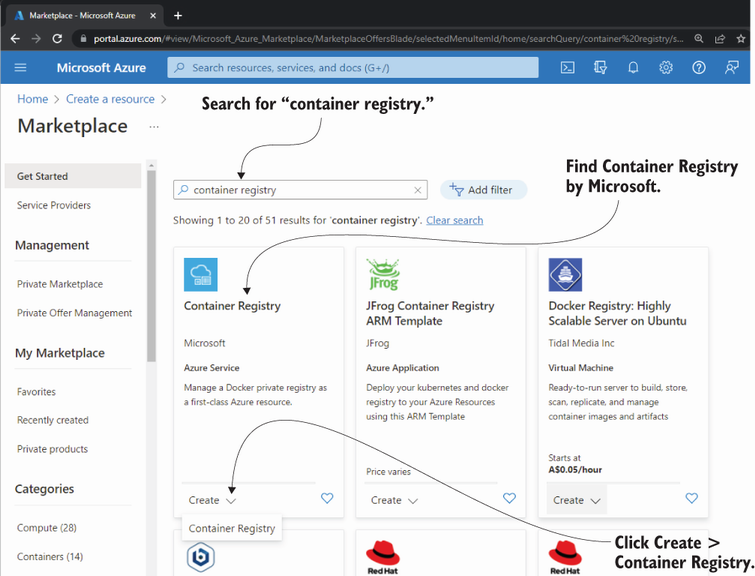
Follow the portal screens for selecting Container Registry and beginning the creation workflow. section 3.9.1
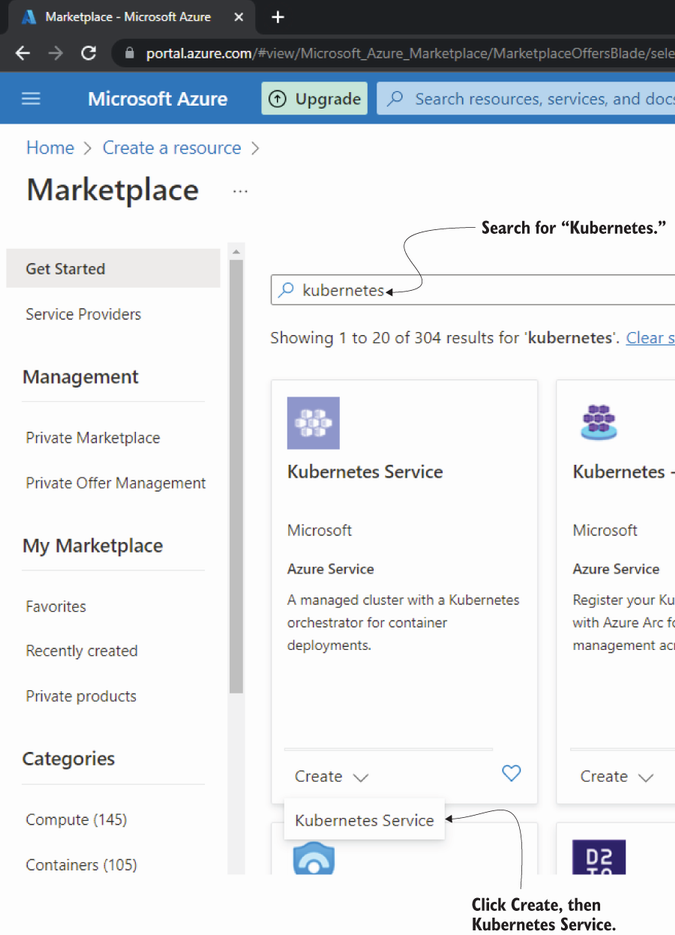
Use the Kubernetes Service screen as the starting point for creating a managed Kubernetes cluster. section 6.9


