Before you create an Azure application, give its resources a place to live. A resource group is a logical container for Azure resources. Every resource belongs to a resource group, and each group belongs to one Azure subscription. You can organize groups by project, department, service, or feature—whatever makes the resources easy to find and manage. section 2.2.1
The choice matters when it is time to clean up. Deleting a resource group also deletes every resource inside it. Keeping a project's resources together can therefore make teardown simple, but check what the group contains before deleting it. Otherwise, a quick cleanup could remove more than you intended. section 2.4 section 2.5
To create and use a group in the Azure Portal:
- Open Resource Groups, select New, and complete the creation wizard. Choose a consistent name; a project name followed by RG is one workable pattern. section 2.2.2
- Select Review + Create, then Create. When creating another resource, such as a storage account, choose the group you just made. section 2.2.2 section 2.2.4
- Expect to supply a subscription and resource group when creating many other services, including a Logic App. section 2.2.9
An image-processing project
An image-processing application keeps its Azure Storage account, Azure Function, and Logic App in one resource group. The services work together, while the group provides one place to manage their lifecycle. When the project is no longer needed, deleting the group removes its resources and helps avoid unexpected charges. section 2.2 section 2.4
Figure 2.53 Steps to delete the resources used in this chapter
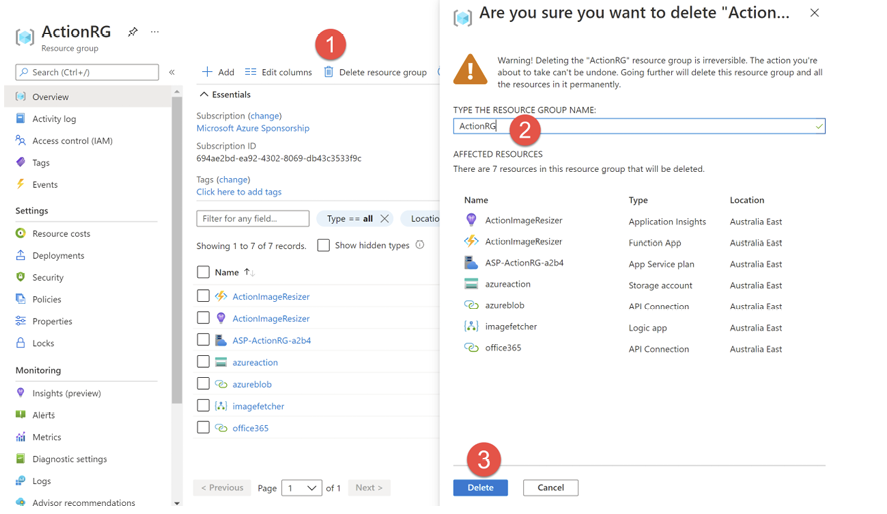
The deletion walkthrough shows where to select Delete Resource Group in the Azure Portal and how to confirm the action by entering the group's name. section 2.4



