An Azure resource group is a logical management container beneath an Azure subscription. Azure resources such as Automation accounts, virtual machines, workspaces, and storage accounts are placed in resource groups rather than directly in subscriptions. section 8.2
Grouping related resources keeps an automation deployment separate from unrelated resources and establishes an administrative boundary. Azure resources inherit permissions through the hierarchy, so the group also helps organize access management. section 8.2
A resource group supports an implementation by:
- Holding the Azure Automation account, Log Analytics workspace, and storage account required for a storage-upload automation. section 8.2
- Providing the target for PowerShell resource-creation commands after connecting to the intended Azure subscription. section 8.2.3
- Supplying a shared naming and location context while individual resources still retain their own naming and regional requirements. section 8.2.3
Create a dedicated automation resource group
Connect to the target subscription, define a group name and region, then create the group before adding dependent resources: `$SubscriptionId = 'The GUID of your Azure subscription'; $ResourceGroupName = 'PoshAutomate'; $AutomationLocation = 'SouthCentralUS'; Connect-AzAccount -Subscription $SubscriptionId; New-AzResourceGroup -Name $ResourceGroupName -Location $AutomationLocation`. Subsequent creation commands reuse `$ResourceGroupName` as their deployment target. section 8.2.3
Figure 8.1 Azure resources required for the storage upload automation. All resources are grouped into a single Resource Group, which resides under a subscription.
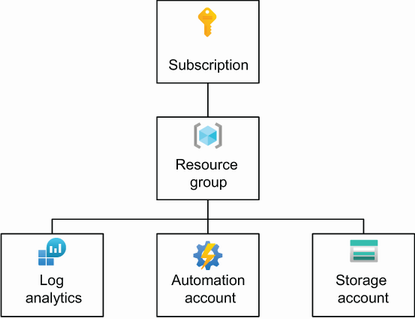
Use the hierarchy diagram to see how the resource group sits below a subscription and contains the resources for one automation. section 8.2



