An Azure tenant is a dedicated Microsoft Entra ID instance: the identity boundary for an organization’s users, groups, applications, and policies. Creating an Azure account gives you a tenant. Think of it as the place Azure checks who someone is before deciding what they can access. section 6.6.1 section 6.3
A tenant is not the same as a subscription. Subscriptions contain resources such as storage accounts and virtual machines, and each subscription is tied to one tenant. A tenant can have several subscriptions—for example, separate development and production subscriptions—under the same identity boundary. The subscription is also the billing entity. section 6.6.1
Figure 6.29 Relationship between an Entra ID tenant, users, subscriptions, and resources. Users and groups belong to the tenant. Subscriptions exist within the tenant, and each subscription contains resource groups, which in turn contain Azure resources.
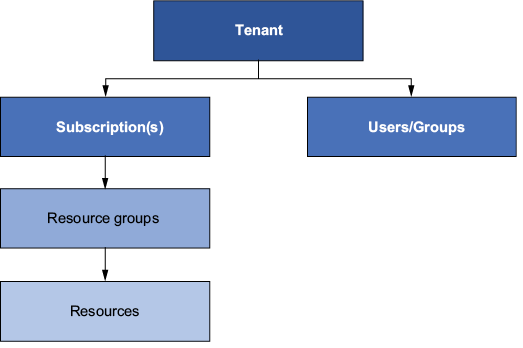
Use this hierarchy to locate each piece: users and groups belong to the tenant; subscriptions sit beneath it; resource groups and Azure resources sit beneath subscriptions. section 6.6.1
When someone signs in, Entra ID checks their identity and tenant, whether they can access the subscription, and what they are allowed to do. Users can be people in the organization or external collaborators invited as guests. Applications and processes can have identities too. Being in the tenant is therefore a starting point, not a free pass to every resource; permissions are handled through role-based access control (RBAC). section 6.6.1 section 6.3
Keeping local files and cloud files together
A business that needs more file storage can connect its on-premises directory to its Entra ID tenant using Entra Cloud Sync. Its users and processes can then authenticate across the local and Azure environments, while Azure File Sync keeps local files and Azure file shares synchronized. The tenant supplies the identity side of this hybrid setup; the storage account holds the cloud file shares. section 1.2.2
