Backward compatibility lets a newer infrastructure-as-code tool version preserve existing configurations and behavior while adding new features. Support usually lasts only briefly before older features are deprecated. section 13.2.2
Manage a backward-compatible upgrade through controlled, incremental changes:
- Pin module, tool, and plugin versions, then inspect breaking changes before selecting an upgrade path. section 13.2.1
- Test the upgrade outside production and avoid jumping directly to the latest version. section 13.2.1
- Refactor high-level resources first, deploy and test them, then proceed toward lower-level resources. section 13.2.2
- Use rolling updates to limit the blast radius, and roll forward when a single resource fails. section 13.2.2
Upgrading from 1.7 to 3.0
A tool upgrade from 1.7 to 3.0 preserves compatibility, so DNS and load-balancer resources are upgraded first. Servers follow one at a time; an override-script failure affects only one server and receives a manual fix. section 13.2.2
Figure 13.6 You plan your tool upgrade path and account for backward-compatible versions and versions with breaking changes.
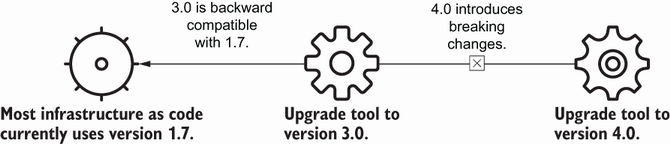
Use the upgrade-path figure to compare backward-compatible steps with versions that introduce breaking changes. section 13.2.1

















