A band scale maps discrete categories to continuous positions within a visual range. In D3, d3.scaleBand() is especially useful for distributing bars across the available space in a bar chart. section 3.4.1 section 3.6
Build a vertical band scale and use it to position and size rectangles:
- Create the scale with d3.scaleBand(). section 3.4.3
- Set the domain to the categorical values, such as data.map(d => d.technology). section 3.4.3
- Set the range to the available screen space, such as [0, 700] for an SVG’s vertical extent. section 3.4.3
- Pass each bound category to the scale when setting a rectangle’s position: .attr("y", d => yScale(d.technology)). section 3.4.3
- Use yScale.bandwidth() for the rectangle height; add paddingInner(0.2) when separation between bands is needed. section 3.4.3
Positioning technology bars
const yScale = d3.scaleBand() .domain(data.map(d => d.technology)) .range([0, 700]); svg.selectAll("rect") .data(data) .join("rect") .attr("y", d => yScale(d.technology)) .attr("height", yScale.bandwidth()); For this scale, yScale("Excel") returns 0, while yScale("D3.js") returns the position of the D3 bar. The scale determines placement and bandwidth determines thickness. section 3.4.3
Sharing a scale across charts
A band scale can also place chart groups horizontally. Set its domain from loaded years, use [0, innerWidth] as the range, and translate each donut group with xScale(year). The same scale can later align a stacked bar chart with the donut charts. section 5.1.1
Figure 3.29 How the band scale distributes the list of technologies within the available vertical space
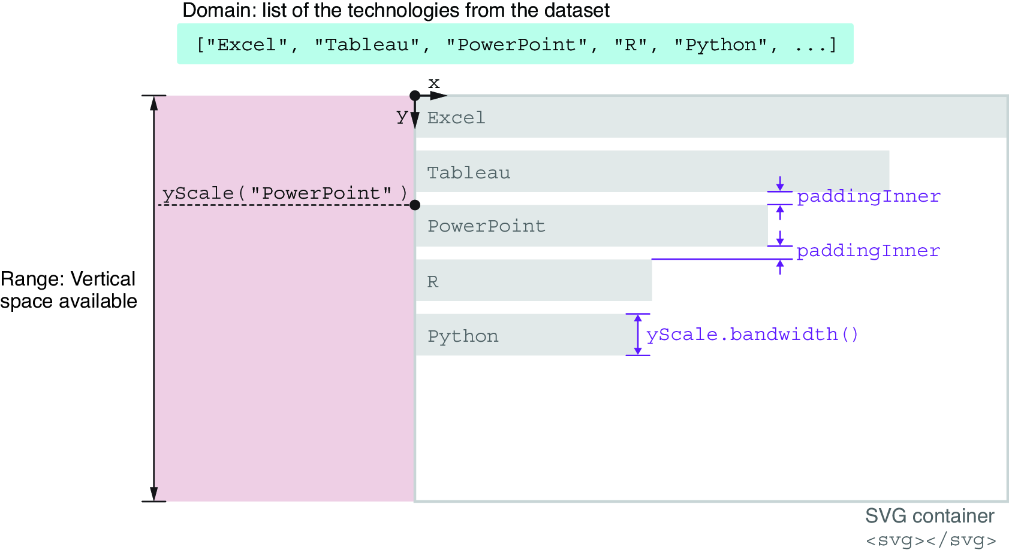
Compare bars distributed without padding and with padding to see how the band scale divides available space. section 3.4.3
