A floor plan is a two-dimensional drawing of a building’s layout. It shows rooms, adjacencies, and scale without the detail or complexity of a full 3D model. Unlike a blueprint, it need not carry precise dimensions, material lists, or construction specifications. In a digital twin, it provides a spatial basis for locating equipment, relating sensors to rooms, and planning sensor placement. section 2.4.1 section 2.2.1
To put a floor plan to work:
- Start from an existing blueprint or architectural drawing, or measure and sketch the rooms. If tracing a blueprint, set a reference measurement so the resulting geometry has the correct scale. section 7.2
- Record where sensors belong on the plan. Align their placement coordinates with its (x,y) coordinate system before overlaying readings; an unlocated reading cannot show where a condition occurs. section 6.2.4
- For a 3D model, add walls, doors, windows, and objects in a 2D plan using Sweet Home 3D. Keep a known reference point at (0,0) in the exported model to avoid later positioning and rotation problems. section 7.2
A home digital twin
A floor plan derived from a home blueprint maps rooms and guides future sensor placement. Overlaying sensor data on that plan connects measurements to physical locations. The same plan can also serve as the starting point for a 3D model; the 3D view adds an intuitive visualization layer but is not required for the initial analysis. section 2.4.1 section 6.2.4 section 2.2.1
Figure 6.9 A data visualization overlaid on a floor plan provides spatial context, linking abstract measurements and metrics directly to their physical location and guiding effective physical actions.
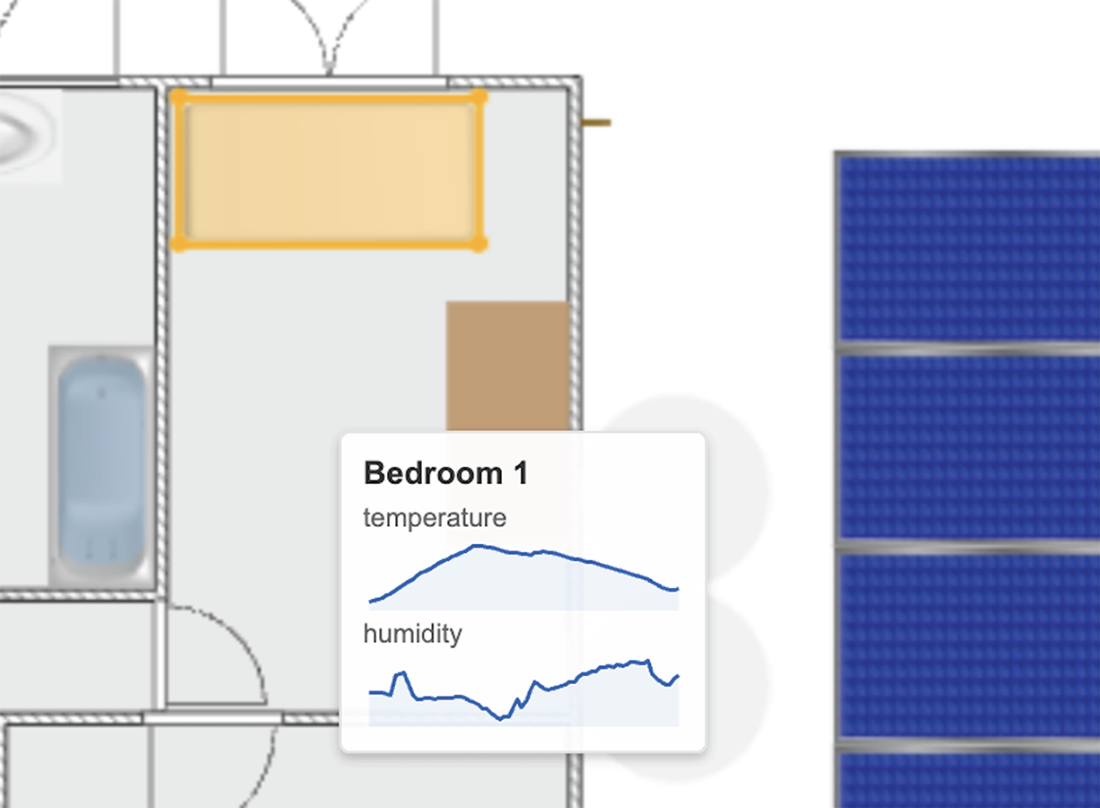
The overlay shows the floor plan’s practical value: measurements become easier to interpret when they appear at their physical locations. section 6.2.4
