A 3D asset is a digital model of an object or environment’s shape and spatial structure. In a digital twin, it can show scale, location, and physical relationships, or give sensor readings a place in the scene. It is not the twin itself, and visual realism is not automatically useful: choose the representation that supports the intended decision or interaction. A floor plan, schematic, network graph, map, or structured building model may be enough. section 2.4 section 2.2.1
Choose what the asset must help people do:
- Inspect the size, shape, and placement of physical components, or compare a built asset with its design. section 2.4
- Place sensor data where it was measured so patterns and anomalies can be understood in context. section 2.4 section 7.3.1
- Support simulation or hands-on training when a spatial environment serves the task. section 2.4 section 1.4.4
From a home blueprint to a web model
For a home digital twin, start with a floor plan that records rooms, equipment, and sensor-to-space relationships. A 3D house is optional for the energy and water analysis, but gives household members a more intuitive view. In Sweet Home 3D, import a scanned blueprint or draw the plan, set a reference measurement, trace the walls, then add doors, windows, and furniture in 2D. The 3D view updates as the plan changes. Export the finished mesh as an OBJ file; its vertices, edges, and polygons can be inspected in an OBJ viewer and rendered in a web page with Three.js. Keep the house center or another known point at (0,0) when exporting: a large offset in the CAD model carries into the twin and can cause rotation problems. section 2.2.1 section 7.2 section 7.2.1
Figure 7.6 Using the scanned blueprint of my home to create a 3D geometric mesh-based model
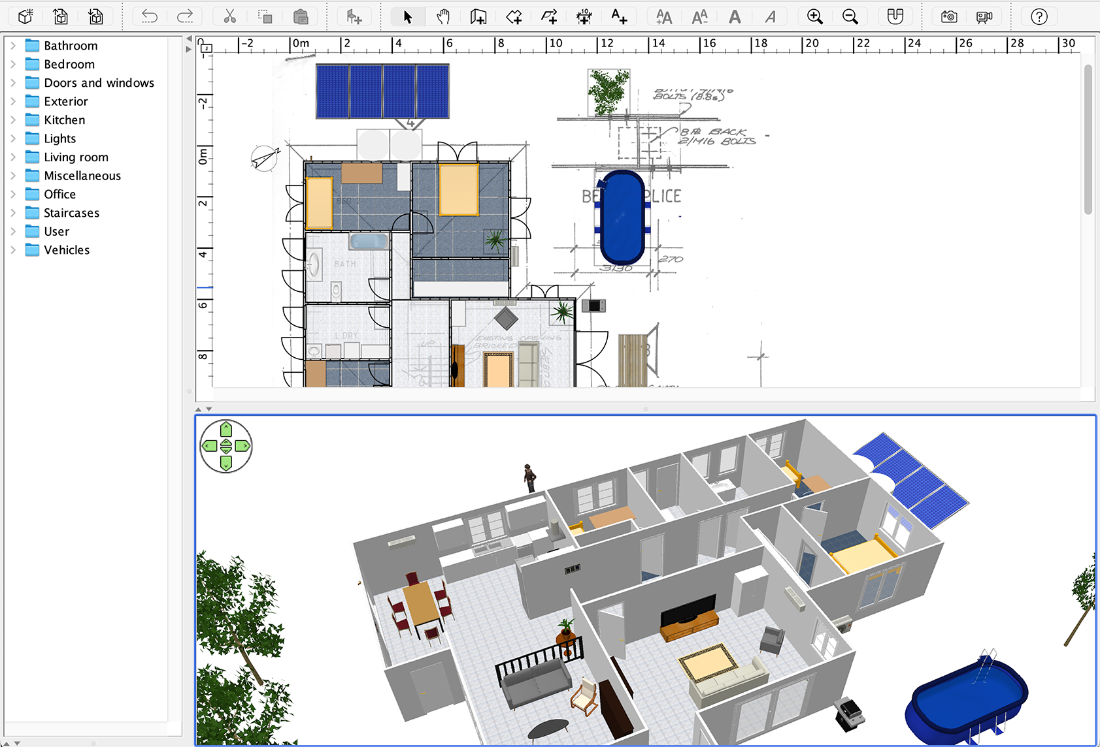
The scanned-blueprint example illustrates the handoff from a measured 2D plan to a mesh-based 3D home model. section 7.2
Placement matters as much as geometry. Georeference a model when it must align with measurements, infrastructure, or other spatial datasets. A shared real-world coordinate frame lets operational readings appear at their actual locations and permits overlays with such data as utility networks or aerial imagery. Without that alignment, a detailed model remains an isolated object. section 7.3.1
Plan for use in the browser, not just appearance in a modeling tool. An OBJ file must download in full before the browser can render a polygon, and its text geometry needs conversion for the GPU; larger files can therefore delay the first view. In 3D, camera controls can also disorient users. Use familiar orbit or walkthrough navigation and provide a Reset Camera control. For larger environments, level of detail, culling, progressive loading, and adaptive quality help preserve responsiveness. section 7.2.1 section 7.7
