A building information model (BIM) is a 3D representation of a building or infrastructure asset that can hold structured information about its components, materials, systems, properties, and relationships. Unlike a purely geometric model, it distinguishes a wall from a slab, duct, pipe, space, or piece of equipment. That distinction lets geometry and asset information be considered together. section 2.4.2
Consider a wall in a facility model. Its shape shows where it is; its identity as a wall makes it more than a shape. BIMs use this combination of spatial and structured information to support decisions about facilities and infrastructure. section 2.4.2
Two choices determine how useful a BIM will be:
- Choose the level of development (LOD) for the decision at hand. LOD 100 represents conceptual design; LOD 500 represents an as-built model verified against the physical asset. section 2.4.2
- Use Industry Foundation Classes (IFC) when an open BIM exchange format is needed. This ISO standard carries both building-element geometry and semantic meaning. section 2.4.2
Figure 2.9 An example of a BIM model in IFC, showing the 3D model and additional information stored within it. © Viktor Kovacs. Data licensed under MIT.
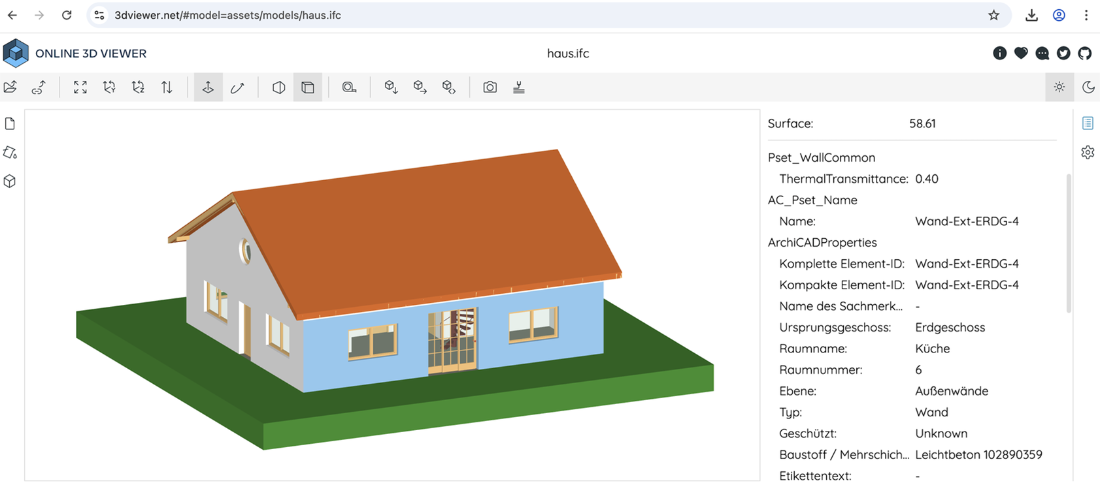
The IFC example shows the 3D model alongside additional information stored with it—the key difference between a BIM and geometry alone. section 2.4.2
Start with the decisions the representation must support, not with a demand for maximum detail. BIM is useful when geometry, system decomposition, and asset information must work together. If the goal is efficient browser visualization, a mesh-based model serves a different purpose; point clouds capture measured geometry, while parametric models support design iteration. Choose the simplest representation and fidelity that meet the objective. section 2.4.2 section 2.7
