BindableLayout is a static attached facility that lets an existing .NET MAUI layout generate child views from a bound collection. Set ItemsSource on the layout and provide a DataTemplate to render each item, much like CollectionView. This is useful when the UI only needs to display data; CollectionView is a better choice when users must select or otherwise interact with collection items. section 6.2
Choose the host layout according to how the generated views should be arranged:
- Use FlexLayout for flowing content that can wrap across lines. section 6.2 section 6.5
- Use HorizontalStackLayout or VerticalStackLayout for simple horizontal or vertical collections. section 6.2
- Avoid Grid for this purpose because generated views need Row and Column values to be arranged correctly. section 6.2
MauiMovies
Build a movie recommendation page with a VerticalStackLayout containing two FlexLayouts. Bind one FlexLayout to selected genres and render them as chips; bind the other to an ObservableCollection of movies inside a ScrollView. Set wrapping and spacing properties, then use a DataTemplate containing a poster, title, and rating for each movie. Load movie and genre data asynchronously with HttpClient when the page appears. section 6.2.1
Figure 6.4 The main UI layout for the MauiMovies app. A list of trending movies is shown, with a poster, title, and rating. At the top of the screen is a list of genres the user has chosen to filter by. The user can tap on this list to change their selection.
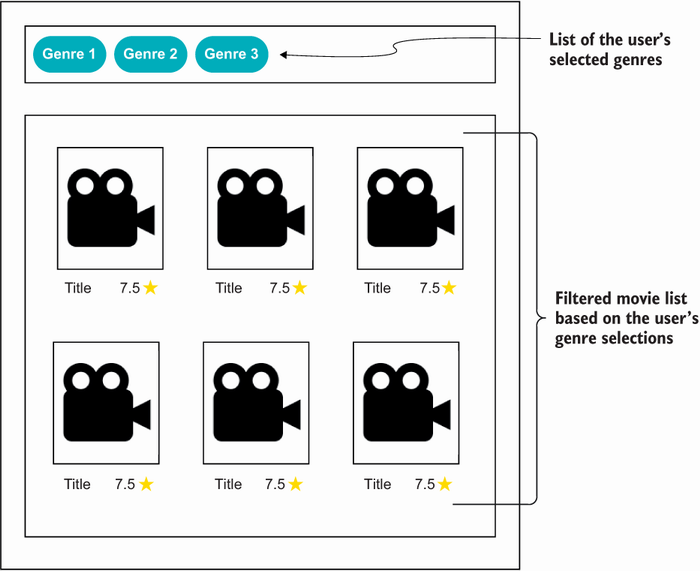
Preview the resulting interface: selected genre chips appear above a wrapped list of trending movies showing posters, titles, and ratings. section 6.2
