FlexLayout arranges child views in a flexible row or column flow. It resembles CSS flexbox and offers direction, spacing, alignment, and wrapping choices. Its key advantage over HorizontalStackLayout and VerticalStackLayout is wrapping: when items no longer fit, FlexLayout can continue them on the next row or column instead of leaving them unavailable in the UI. section 5.4
Figure 5.21 A HorizontalStackLayout is used to arrange child items in the top example. Child items that don’t fit on screen are simply not visible. The bottom example arranges the same child items in a FlexLayout with its direction set to row. Items that don’t fit on screen are wrapped to the next row.
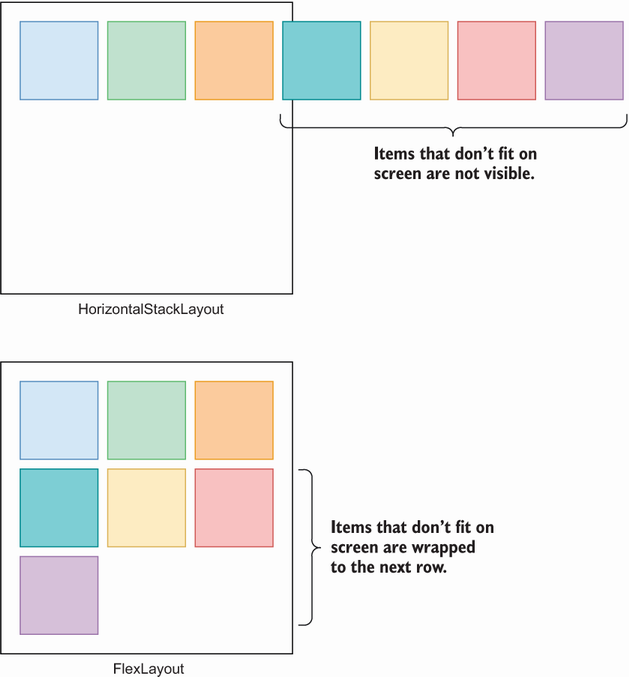
Compare a horizontal stack with a row-oriented FlexLayout: overflowed children disappear from the stack but wrap in FlexLayout. section 5.4
Choose FlexLayout when a group must adapt to available space without requiring every item to remain on one line. Set its direction for a row or column, then use wrapping and content justification to control how the resulting lines use space. For a simple fixed sequence that does not need wrapping, a stack layout remains a practical alternative. section 5.4 section 5.0
Common layout patterns include:
- Display selected genres as chip-like views by binding a collection to a FlexLayout with BindableLayout. section 6.2.1
- Render movie cards from a Movies collection inside a ScrollView, using Wrap so cards move to another line when needed. section 6.2.1
- Place grouped controls at opposite ends of a title or filter bar with JustifyContent set to SpaceBetween. section 6.4.3 section 6.4.4
- Center a logo, label, and login button in a column by combining Direction="Column", AlignItems="Center", and SpaceAround. section 8.1.1
Wrapping a data-bound movie gallery
Put a FlexLayout inside a ScrollView, bind BindableLayout.ItemsSource to a Movies collection, set Wrap="Wrap", and provide a DataTemplate for each card. JustifyContent can distribute the cards across each row; a VerticalStackLayout inside the template can arrange a poster, title, and rating. section 6.2.1 section 6.5
FlexLayout also works well inside larger compositions. A Grid can define major page rows, while a FlexLayout handles the flow within a row; nested HorizontalStackLayout elements can keep related controls together while SpaceBetween separates the groups. section 6.4.3 section 6.4.4
