HorizontalStackLayout is a simple .NET MAUI layout that places child views sequentially from left to right. Add controls or other layouts to its Children collection; they render in the order added. section 5.3
Use it for quick prototypes, trivial apps, and compact horizontal groups. Its Spacing property adds gaps between children, helping establish visual grouping and hierarchy without requiring borders or shadows. section 5.3
Build larger interfaces by combining stack layouts with other .NET MAUI layouts:
- Create a product card with a VerticalStackLayout for the title and description, followed by a Label for the price. section 5.3
- Place a Switch and a Label in a HorizontalStackLayout to form a focused-inbox control group. section 6.4.4
- Use a second HorizontalStackLayout for an icon and Filter label inside a FlexLayout row. section 6.4.4
Product card structure
A card can use a HorizontalStackLayout as its outer container. Put a VerticalStackLayout first for the product title and description, then place a price Label beside it. Increase or reduce Spacing to control the relationship between these elements. section 5.3
Figure 5.18 The cards themselves are a HorizontalStackLayout that arrange their child views horizontally on screen, from left to right.
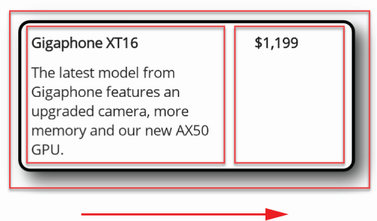
See the card-level arrangement of child views from left to right. section 5.3
Choose HorizontalStackLayout when children belong in one straightforward horizontal sequence. Combine it with VerticalStackLayout for nested compositions; use Grid or FlexLayout when the interface needs broader row, column, wrapping, or positioning control. section 5.5 section 6.5
