VerticalStackLayout is a .NET MAUI layout container that places child views in sequence from top to bottom. Add views to it in the order they should appear: the first is shown at the top and each later view is placed underneath. Its children can be controls such as Image, Label, and Button, or other layouts. section 2.3 section 5.3
Use it when a screen region naturally reads as a vertical flow: a heading followed by content, a form-like group, a card, or an icon above a label. It is one of the simplest layout choices, making it useful for quick prototypes and small interfaces. For a richer arrangement, nest it inside other layouts or place other layouts inside it. section 5.3 section 5.5
Stacking a simple page
A ScrollView can contain a VerticalStackLayout, which in turn contains an image, two labels, and a button. The stack keeps these views in reading order while the ScrollView makes content available when it exceeds the screen. In XAML, declare the layout as the parent element and put each child view between its opening and closing tags. section 2.3 section 5.5
Spacing is a key property for a vertical stack. It inserts a gap between each child view, helping communicate which elements belong together and which are separate. Padding adds room around the layout’s contents; for example, a page-level stack can use Spacing="10" and Padding="30". Layout alone, especially deliberate spacing, can establish visual hierarchy without borders or shadows. section 5.3 section 6.2.1
A product card
To build a product card, use a HorizontalStackLayout for the broad left-to-right structure. Put a VerticalStackLayout on its left to stack the product title and description, then place a price label beside it. Repeating those cards vertically creates a product list; mixing horizontal and vertical stacks handles the different reading directions within the same design. section 5.3 section 5.3
Figure 5.20 This UI uses a combination of VerticalStackLayout and HorizontalStackLayout. It doesn’t have any borders or shadows but instead uses spacing to group elements.
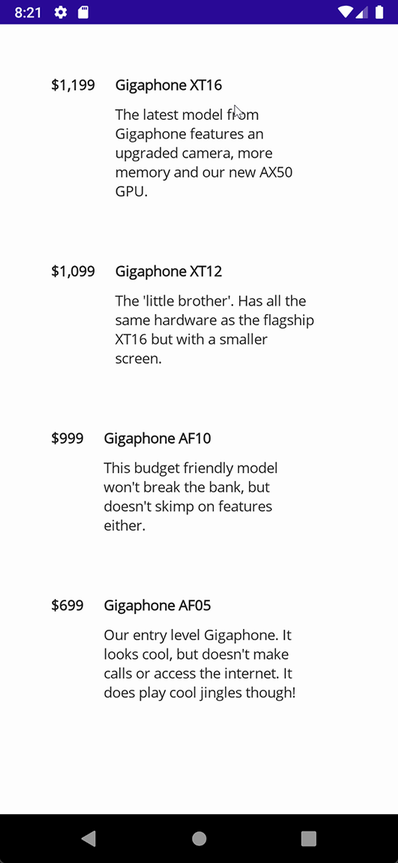
This layout example shows how horizontal and vertical stacks can group related UI elements through spacing rather than decorative borders or shadows. section 5.3
VerticalStackLayout also works as a structural wrapper in larger screens. A movie page uses a top-level stack to place a genre-selection area before a scrolling movie area. A tab bar uses a Grid for three side-by-side tabs, then uses one VerticalStackLayout per tab to put its icon above its label. Choose Grid when rows and columns define the main structure; choose a vertical stack for an ordered top-to-bottom group within that structure. section 6.2.1 section 6.4.6 section 5.5
Stacks can participate in data-driven UI as well. VerticalStackLayout is a candidate for BindableLayout, which can add child items from a data source using a DataTemplate. This is an option when sequentially generated items suit the interface; FlexLayout is also highlighted for bound content that needs wrapping. section 6.5 section 6.2.1
Prefer a VerticalStackLayout for straightforward sequential content. Combine it with HorizontalStackLayout for simple composite layouts, with ScrollView for overflow, and with Grid when a design requires explicit rows and columns. This keeps the layout aligned with the visual relationship the interface needs to express. section 5.5 section 5.3
