ScrollView is a .NET MAUI control that makes child content scrollable when it is larger than the visible screen area. Place it around content that may not fit, so users can swipe to reach the rest instead of seeing only the visible portion. section 5.2 section 2.3
Wrap a vertical page layout
A ScrollView can contain a VerticalStackLayout holding an image, labels, and a button. This keeps the page content available when its total height exceeds the screen. section 2.3
Figure 5.15 Large amount of text shown on the left in a VerticalStackLayout. The content is too long to fit on the screen, so the user is only able to read the first few lines. On the right, the same text is shown in a ScrollView, so the user can swipe up and down to see the full body of the text.
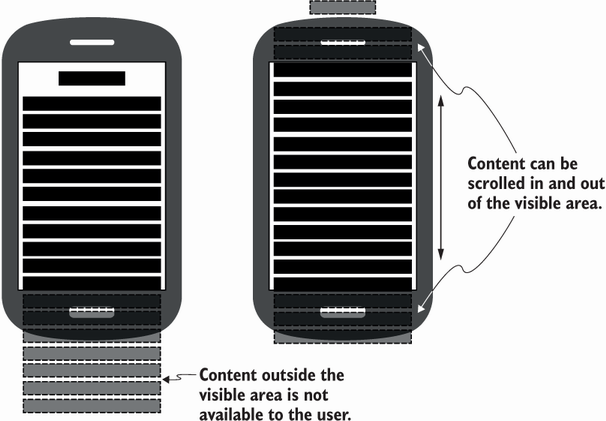
Compare text placed directly in a VerticalStackLayout with the same text inside a ScrollView: scrolling makes the complete text reachable. section 5.2
Choose a scroll direction to match the content:
- Use vertical scrolling by default for content that extends down the page. section 5.2
- Use horizontal scrolling when the content needs to extend sideways. section 5.2
- Use both directions to pan a full-scale image, or to support users who prefer large text. section 5.2
Avoid nested scrolling views and overlapping scroll gestures. A ScrollView inside another ScrollView, a CollectionView inside a ScrollView, or scrolling content in a bottom sheet can make swipes unpredictable. Perpendicular directions are the exception: a vertically scrolling page can contain a horizontally scrolling CollectionView. section 5.2
Keep a movie gallery reachable
Wrap a FlexLayout bound to a Movies collection in a ScrollView to keep a wrapped movie gallery accessible below the rest of a vertically arranged page. section 6.2.1 section 5.5
