A control is a .NET MAUI view that either displays information or receives input. Labels and images render content; entries, check boxes, and date pickers let people interact with an app. section 4.0 section 4.2.1 section 4.2.2
Figure 4.2 An app knows how to render pages, and pages know how to display a single layout. Layouts define how to arrange controls or other layouts on the screen. In this example, an app renders a home page with a Grid layout as a child. The Grid layout here has five child items, including a VerticalStackLayout in the middle. The VerticalStackLayout has three controls as child items: an Image, a Button, and an Entry.
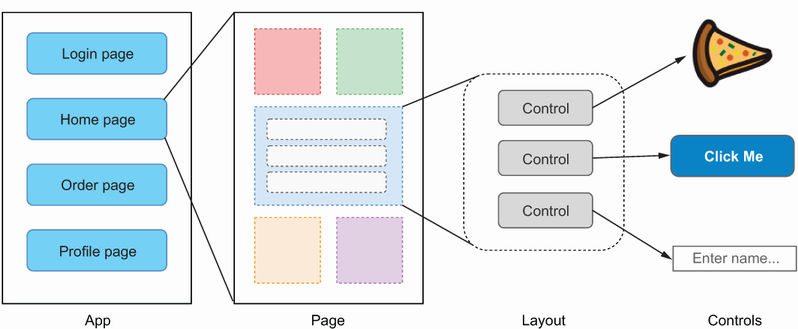
Place controls inside layouts, and place that layout on a page. The app renders the page; the page renders its layout; the layout arranges its controls. section 4.1
Choose a control by the value or interaction the screen needs:
- Use Label for text, ProgressBar for fractional progress, and ActivityIndicator when work is occurring without a completion amount. section 4.2.1
- Use Entry or Editor for text; use CheckBox for an on/off choice; use DatePicker or TimePicker for dates and times. section 4.2.2
- Use Slider or Stepper for numeric values, RadioButton for one displayed choice, and Picker for one listed choice. section 4.2.2
Built-in controls are cross-platform abstractions: an Entry uses the appropriate native appearance on iOS or Windows without separate implementations. Their appearance can be customized, and additional controls are available through the Community Toolkit and UI kits. section 4.2 section 4.0
Connect an input control to app data
An Entry exposes a string Text property. Read it directly in code, or bind it to a matching source property. Because built-in controls inherit BindableObject, their target properties can participate in data binding; a binding context lets several properties use one source object. section 3.4 section 4.2.2
For a page with several elements, assign a layout or ScrollView as the page content rather than placing one control directly on the page. Reusable controls can later be composed from built-in controls or customized through handlers. section 7.1 section 11.0
