.NET MAUI (Multiplatform App UI) is a .NET framework for building installable, native UI applications for Android, iOS, macOS, and Windows. A single project and shared code base can target those platforms while producing a native executable for each one. Application logic is written in C#; UI can be defined with XAML or code. section 1.2 section 1.3
Figure 1.2 .NET MAUI is built bottom-up. Each platform provides APIs, and there is a .NET runtime for each platform (WinRT on Windows, Mono on everything else) built on these APIs. Each layer provides APIs used to build the APIs in the layer above. Meanwhile, your code is written top-down: you write a .NET MAUI app, and the architecture encapsulates it for lower layers.
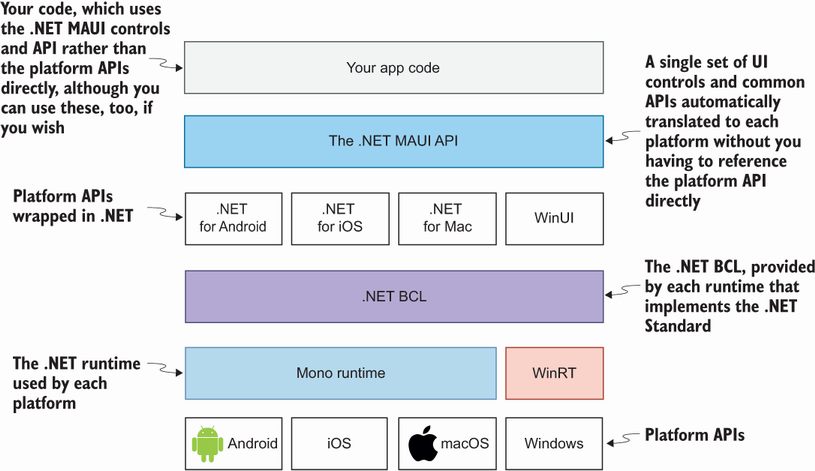
MAUI sits above platform APIs, platform runtimes, and the .NET base class library. Code is written against the MAUI layer while the underlying stack supplies each target platform’s native capabilities. section 1.2
MAUI is suited to apps that need an installable binary, offline data protection, multithreading, or broader device access than a browser can conveniently provide. Common APIs abstract capabilities such as location and sharing across platforms, though consent and platform-specific permission metadata still matter. section 1.3 section 3.1
A practical MAUI workflow is:
- Create an app from a Visual Studio template or with the .NET CLI, for example `dotnet new blankmaui`. section 2.1 section 2.1.3
- Choose a target platform and run the single project; multitargeting replaces separate per-platform UI projects. section 2.2 section 2.2.1
- Use Hot Reload to apply UI changes while the app runs, and use Visual Studio tooling when live preview, IntelliSense, debugging, or testing helps. section 2.1 section 2.5
Aloha, World! app structure
A generated app starts in `MauiProgram.CreateMauiApp`, where a host builder calls `UseMauiApp<App>()` and builds a `MauiApp`. The `App` class assigns a `Page` to `MainPage`; MAUI then displays it. A typical XAML page nests an image, labels, and a button in a `VerticalStackLayout` inside a `ScrollView`. section 2.3
XAML is the usual choice for declaring UI and pairs naturally with MVVM: the View renders controls, the ViewModel holds view state and coordinates interaction with the Model, and the Model contains problem-domain objects and services. C# UI declarations are also available. For multipage apps, MAUI supports hierarchical, tabbed, and flyout navigation; Shell adds route-based navigation and deep-link support. section 1.5 section 7.4
Because MAUI is a .NET workload, it works with familiar .NET tooling, packages, build systems, and patterns. It can also share selected client logic with related .NET applications, such as Blazor clients and ASP.NET Core services, while preserving each layer’s responsibilities. section 1.4
