A cross-platform UI application provides a shared user interface and application logic that run across multiple operating systems. .NET MAUI targets Windows, macOS, iOS, and Android, helping developers build native mobile and desktop experiences from one codebase. section 1.0 section 1.2
With .NET MAUI, write application logic in C# and define the interface in XAML or C#. The shared code runs through platform runtimes and abstractions while exposing platform-specific APIs when needed. section 1.2
A practical cross-platform UI workflow includes:
- Create a mobile or desktop application with .NET MAUI using Visual Studio or the .NET CLI. section 2.0
- Run the application on a target platform and use Hot Reload to see interface changes immediately. section 2.0
- Keep shared behavior and interface definitions common, while using platform APIs through .NET abstractions where necessary. section 1.2
One application, four platforms
A .NET MAUI application can provide a rich interactive UI for Windows, macOS, iOS, and Android without changing its .NET application code between targets. section 1.2
Figure 1.2 .NET MAUI is built bottom-up. Each platform provides APIs, and there is a .NET runtime for each platform (WinRT on Windows, Mono on everything else) built on these APIs. Each layer provides APIs used to build the APIs in the layer above. Meanwhile, your code is written top-down: you write a .NET MAUI app, and the architecture encapsulates it for lower layers.
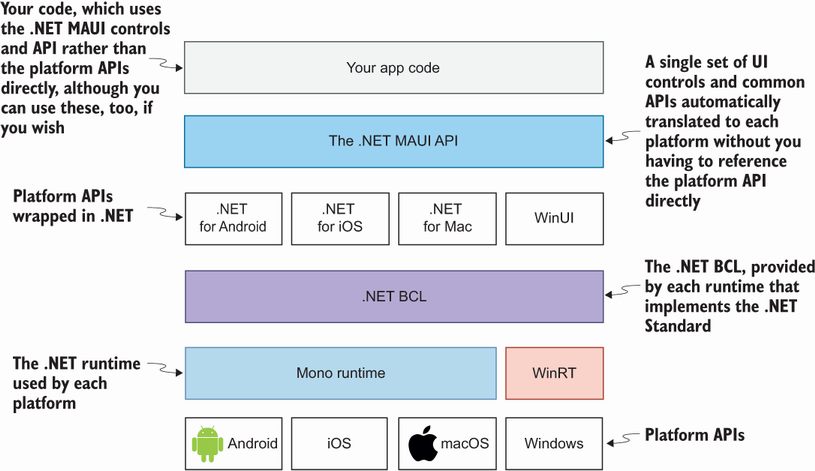
Use the architecture diagram to trace how platform APIs and runtimes support the higher-level .NET MAUI application. section 1.2
